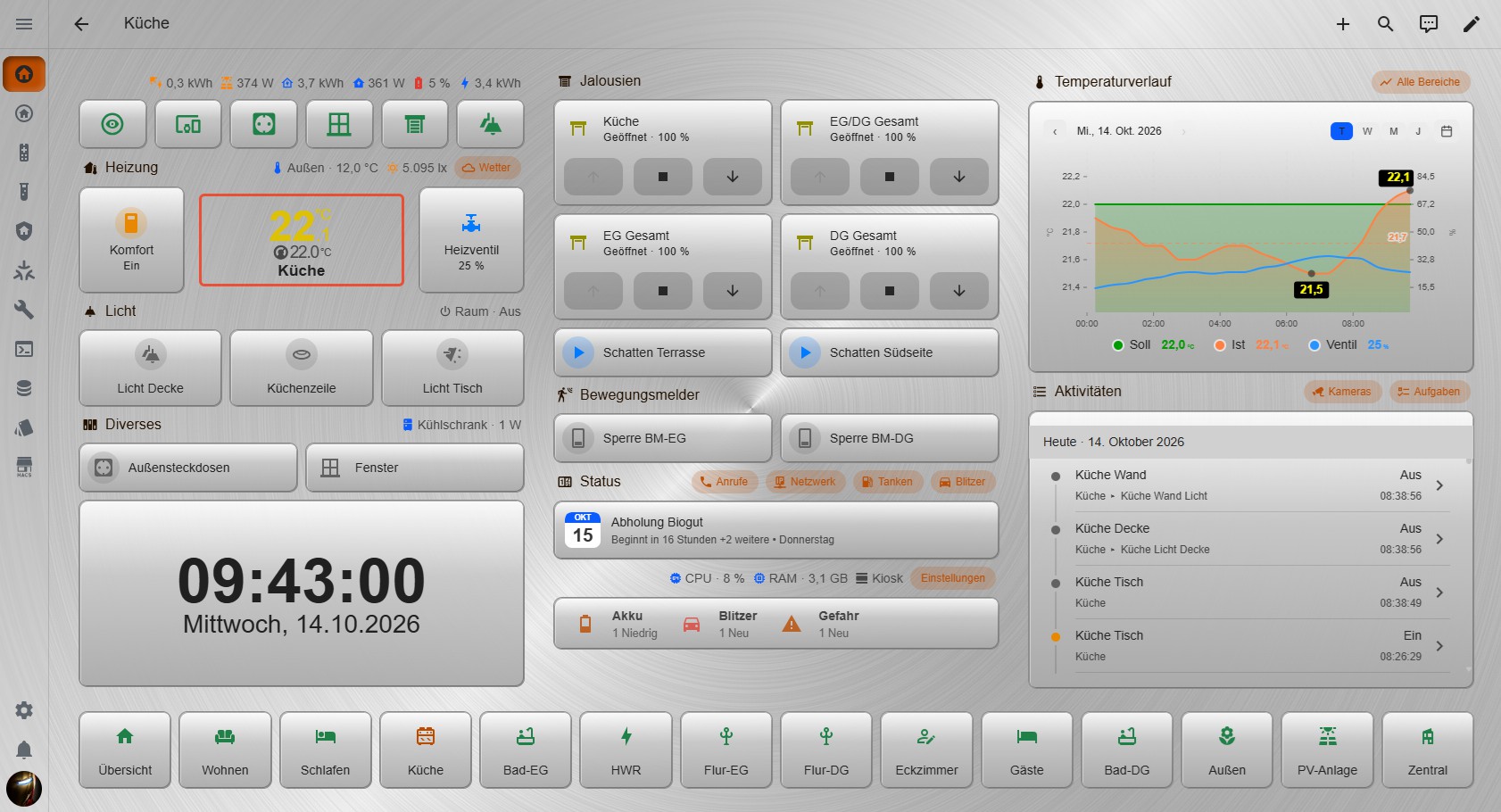
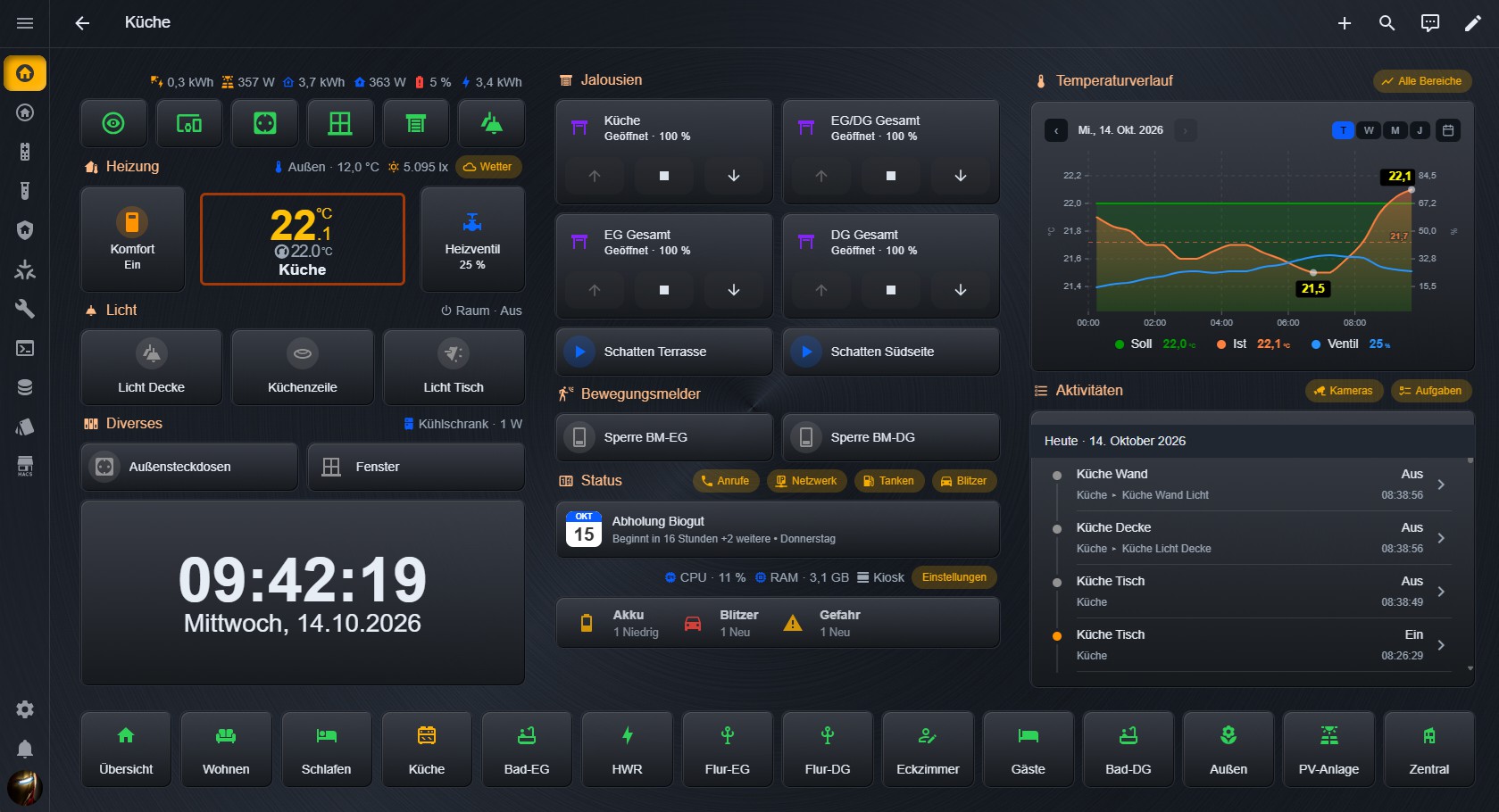
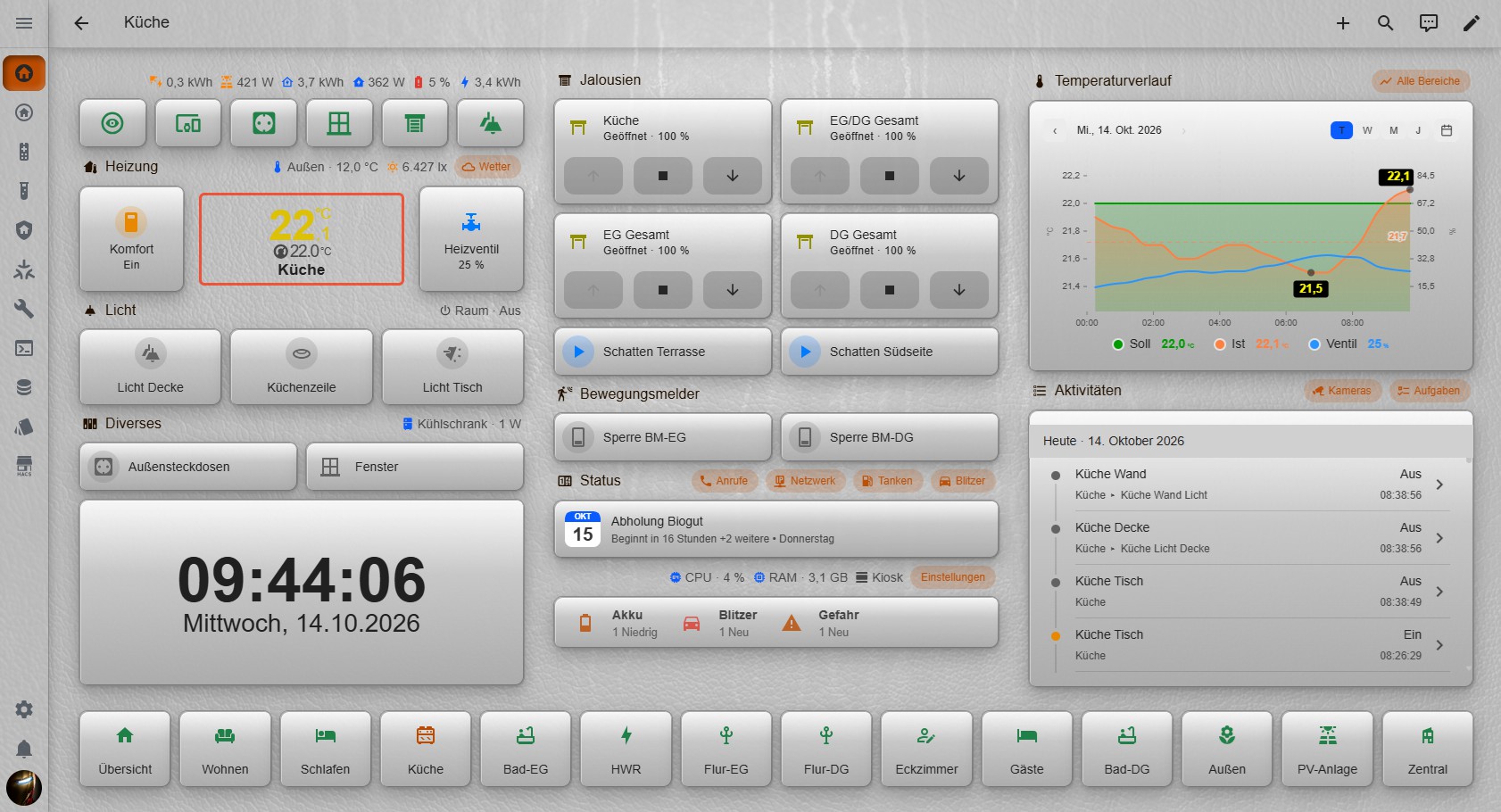
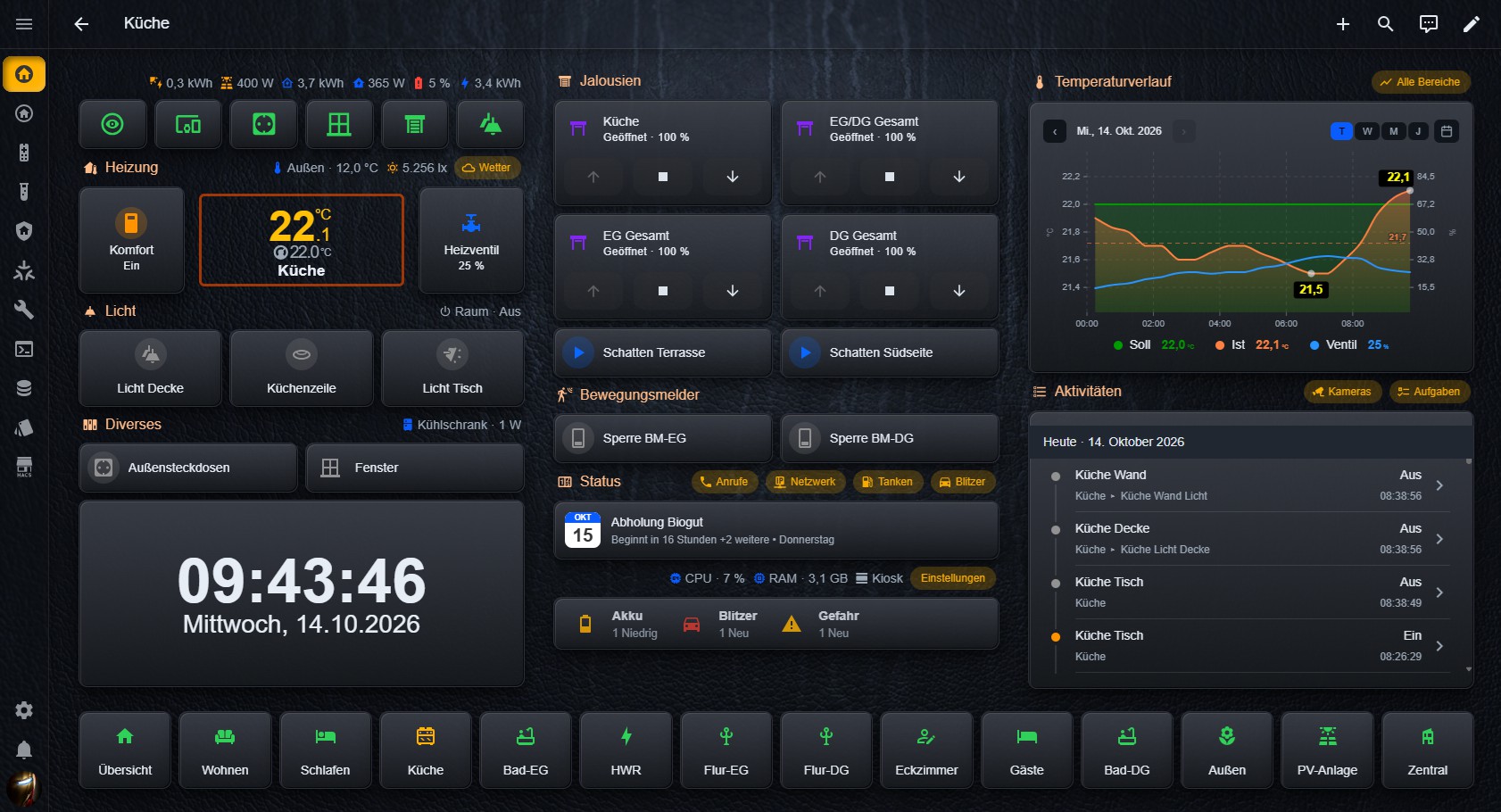
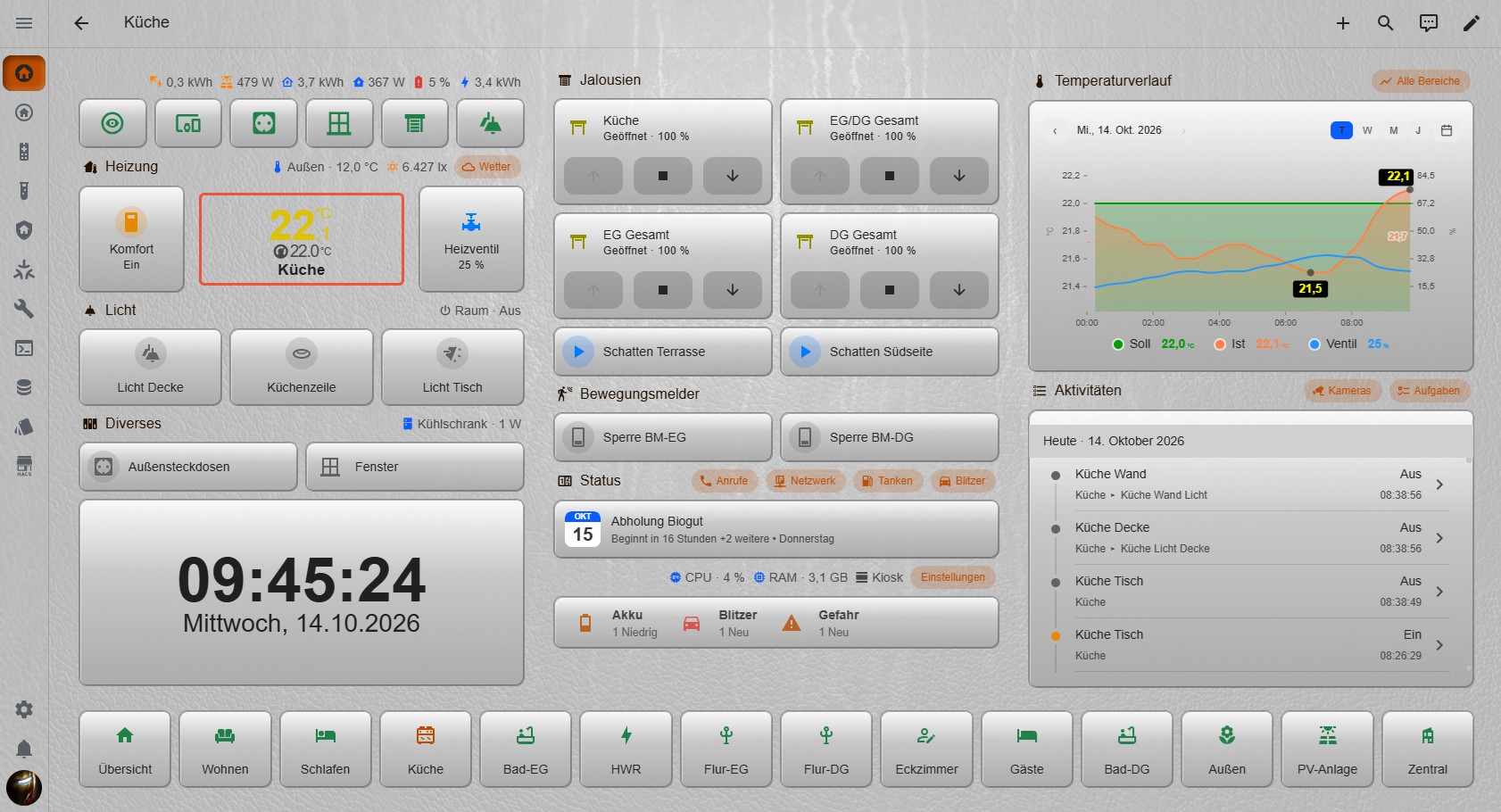
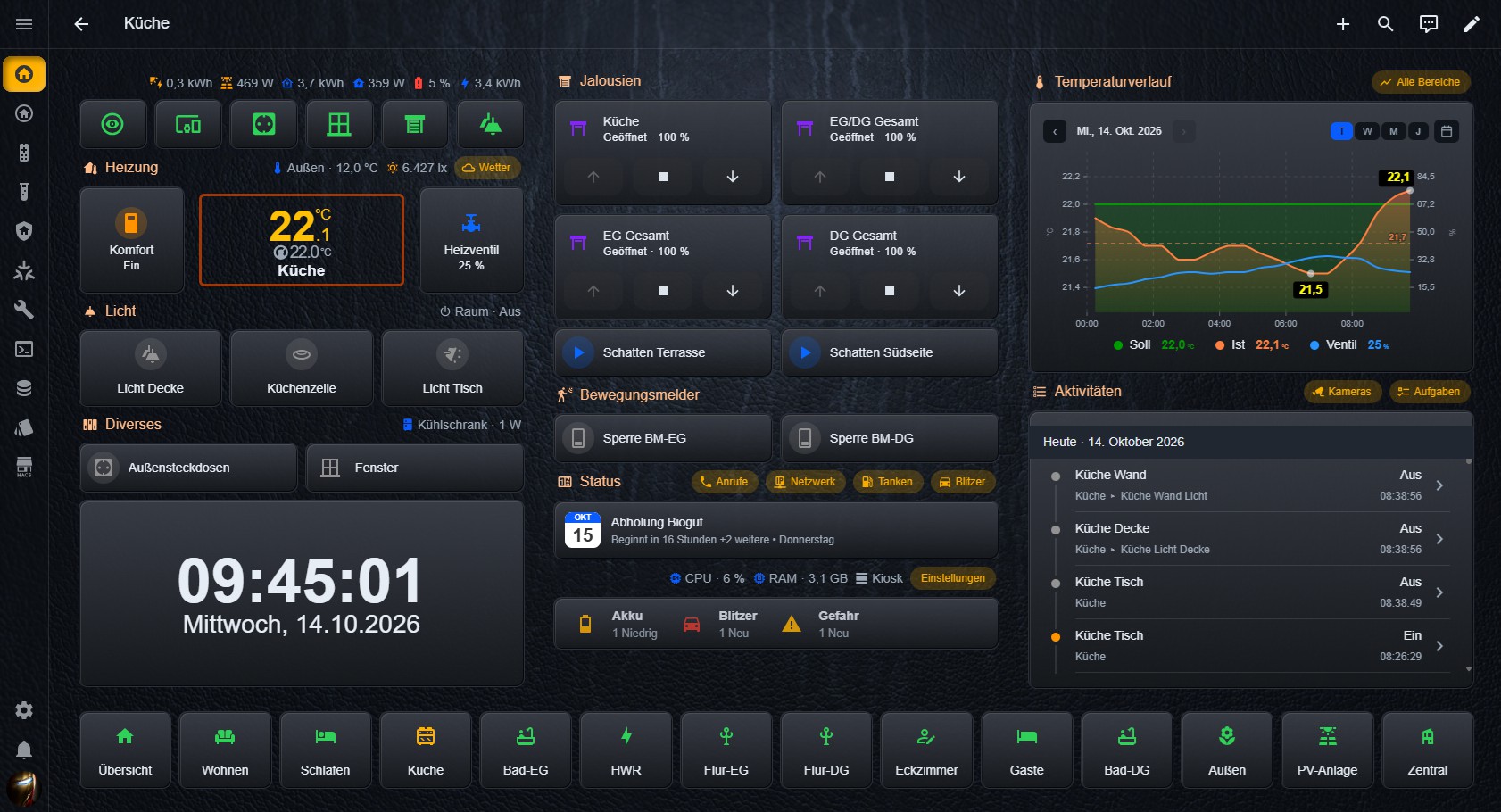
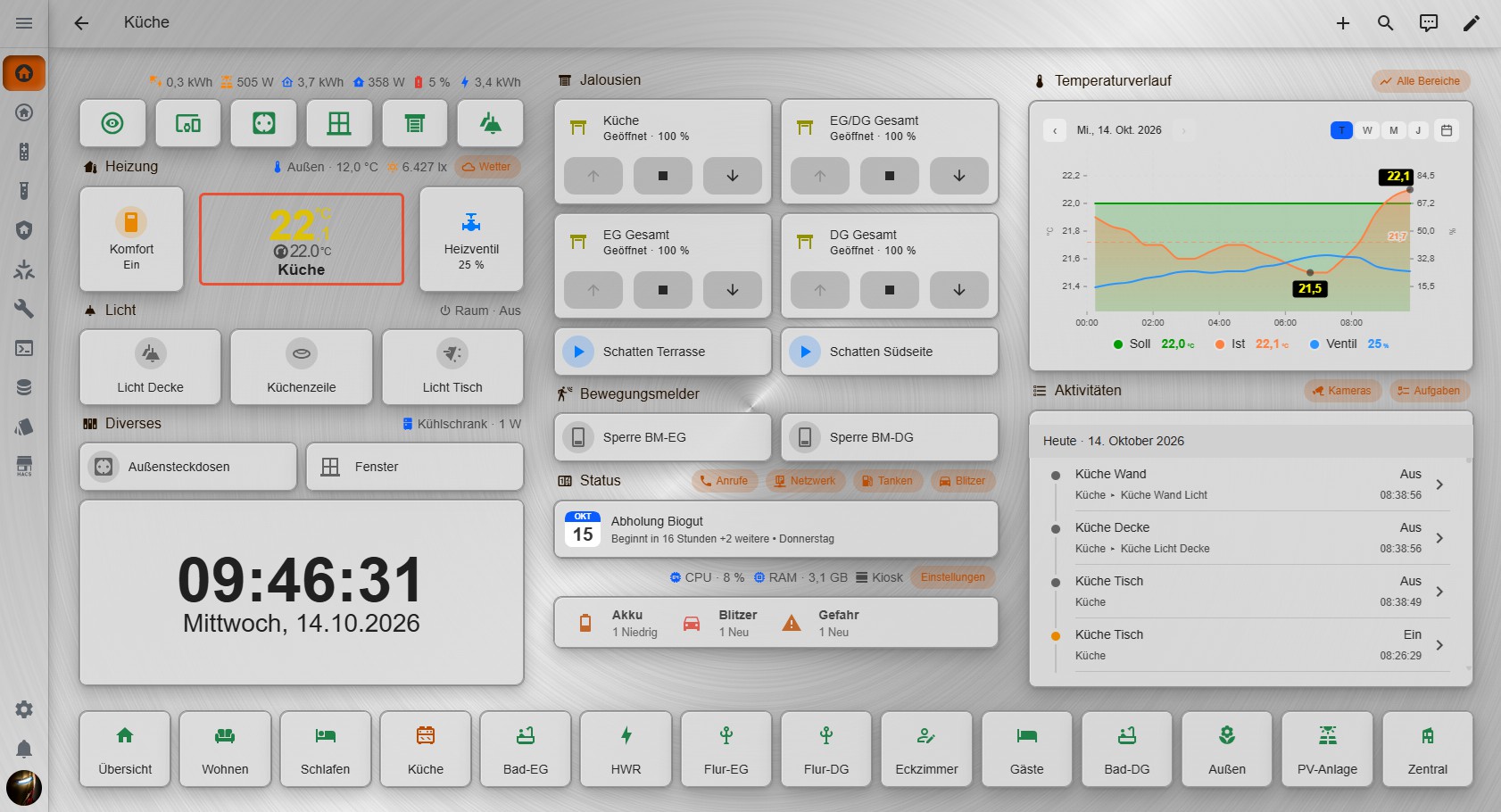
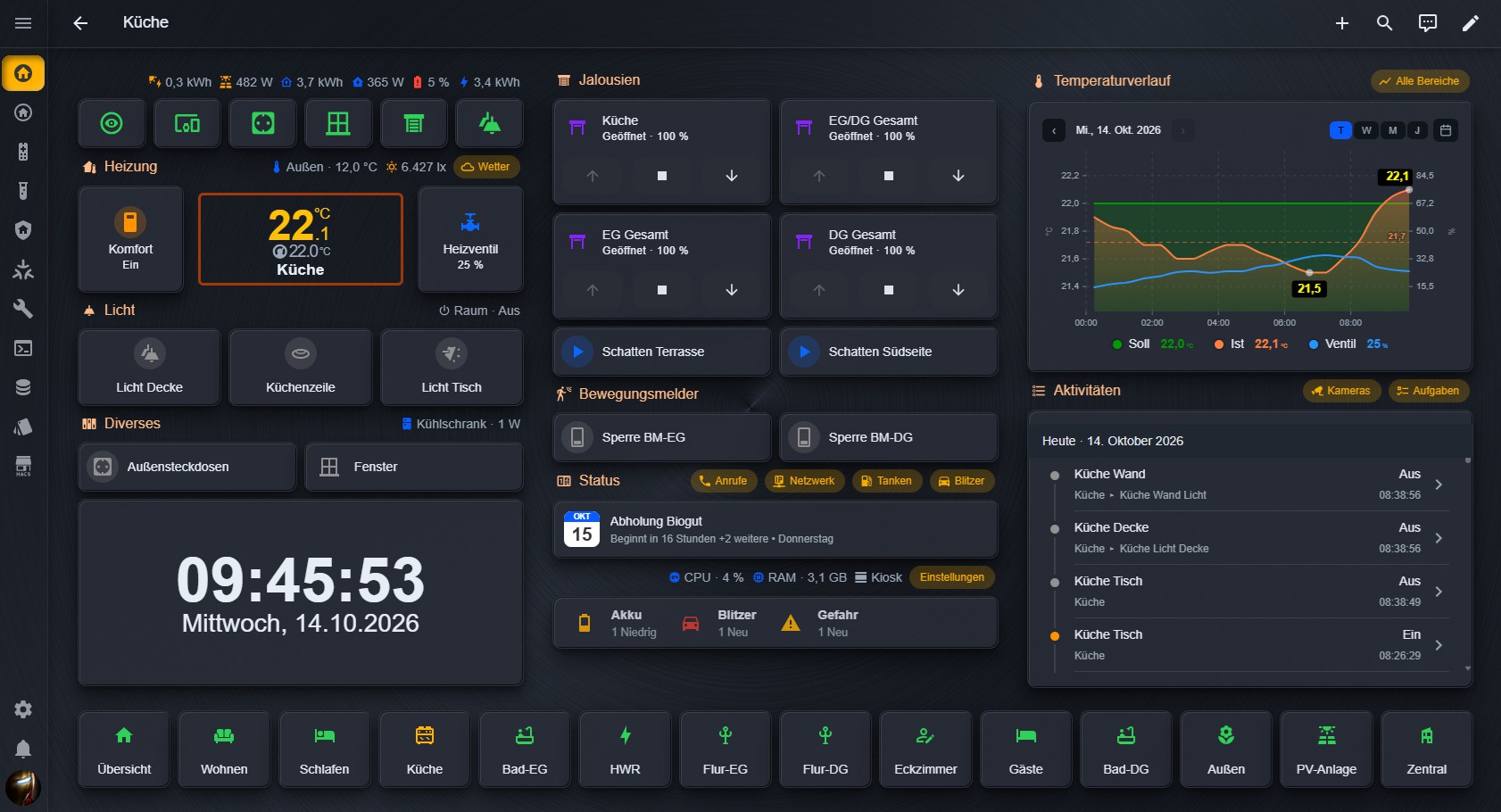
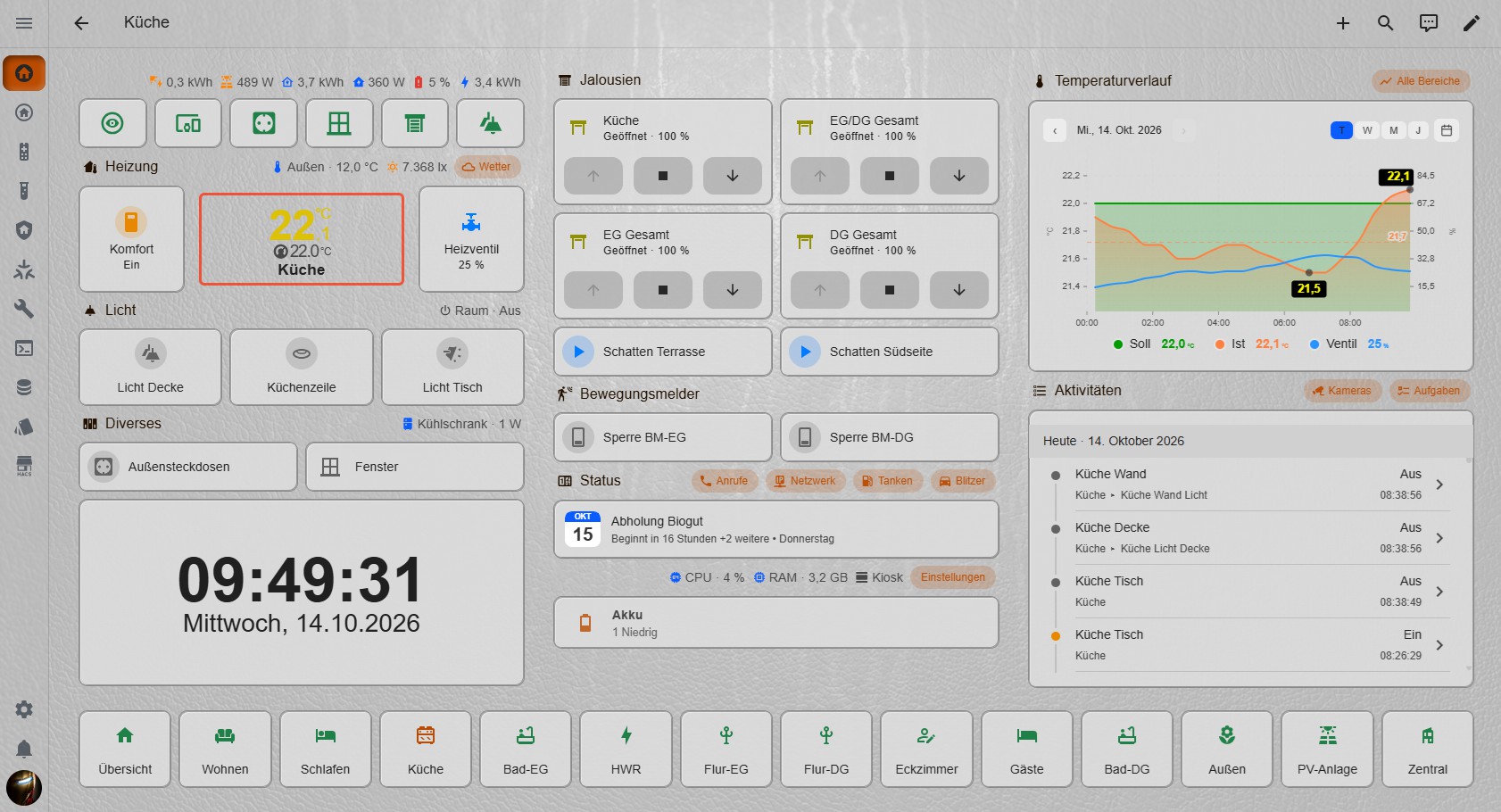
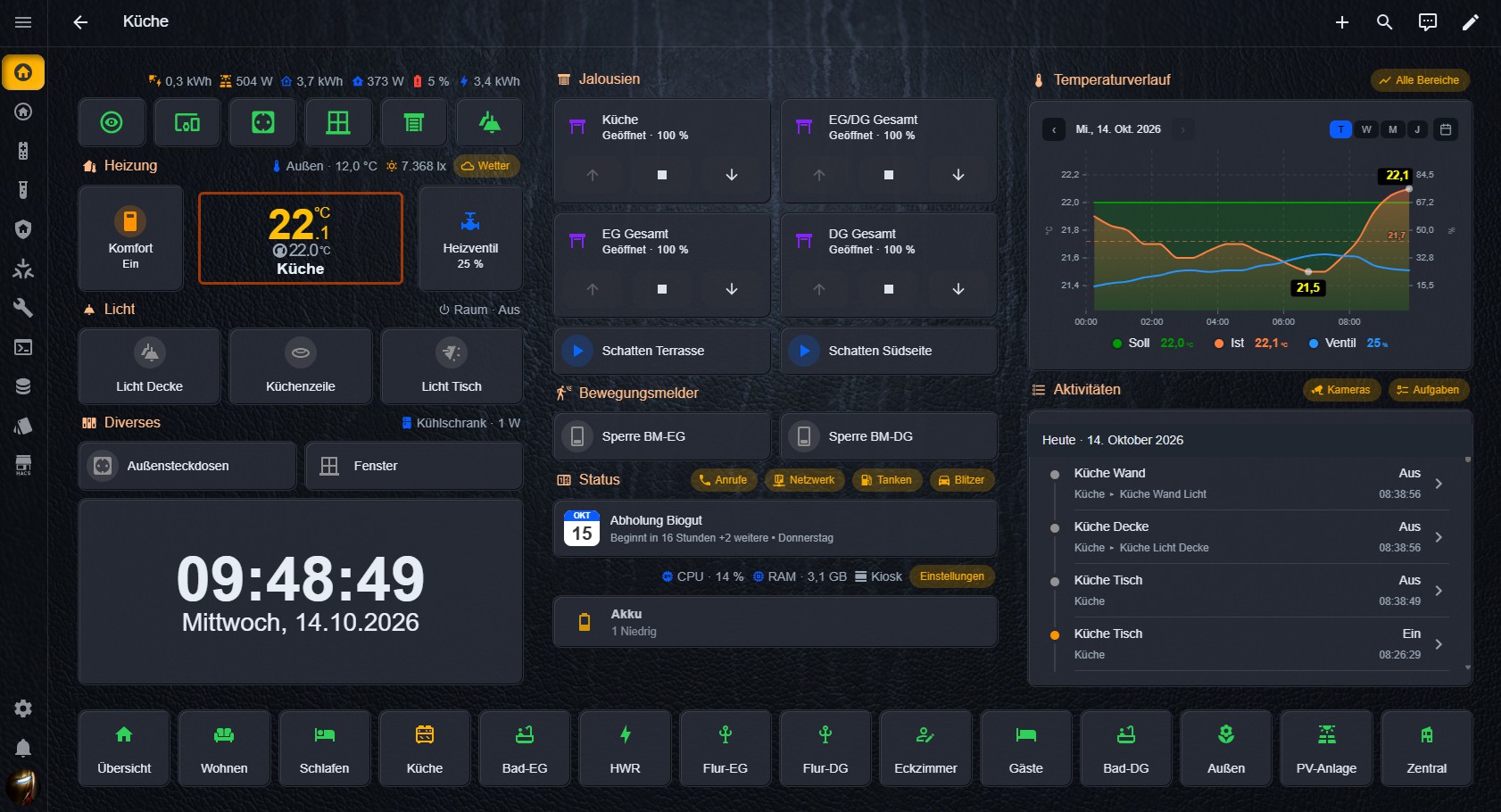
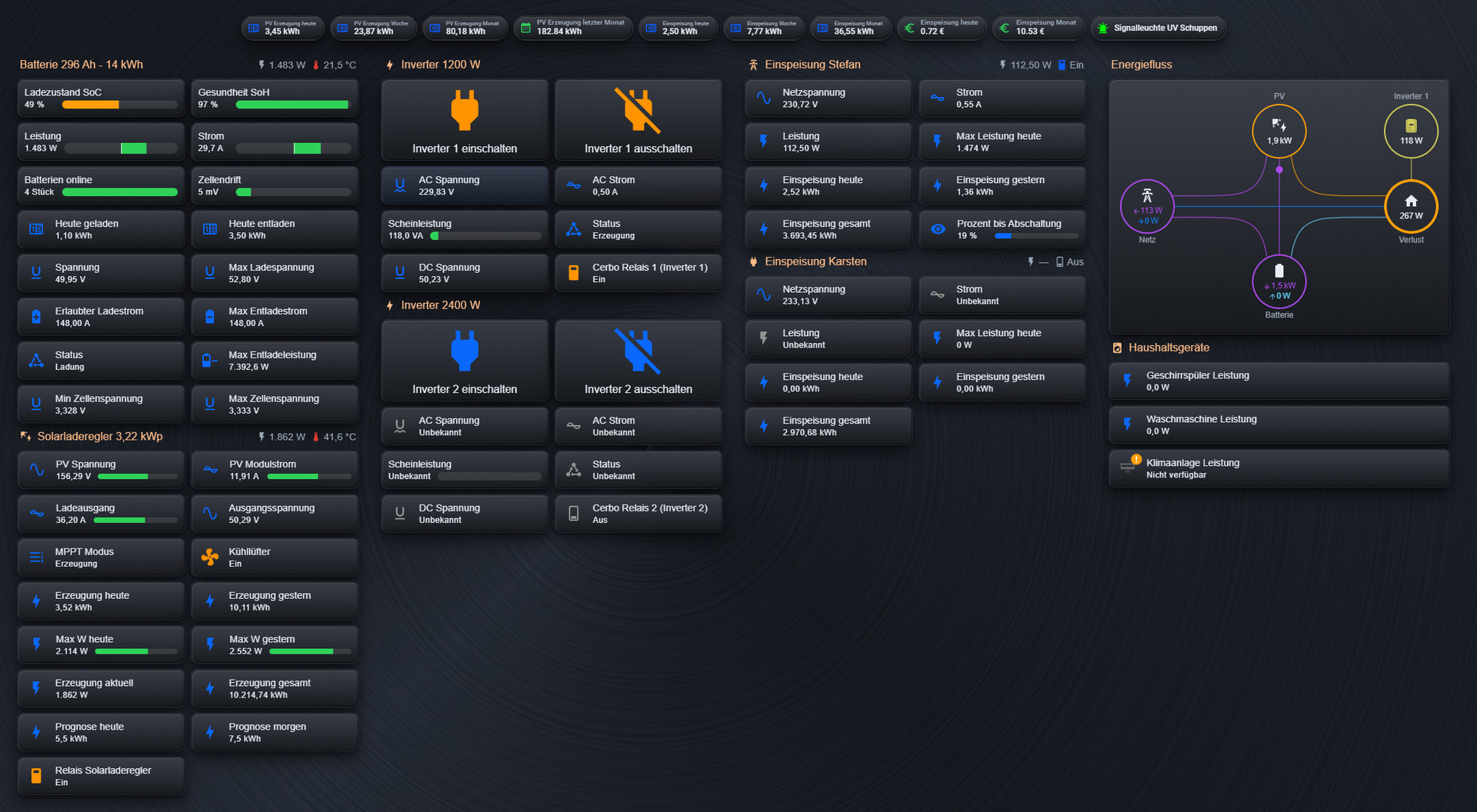
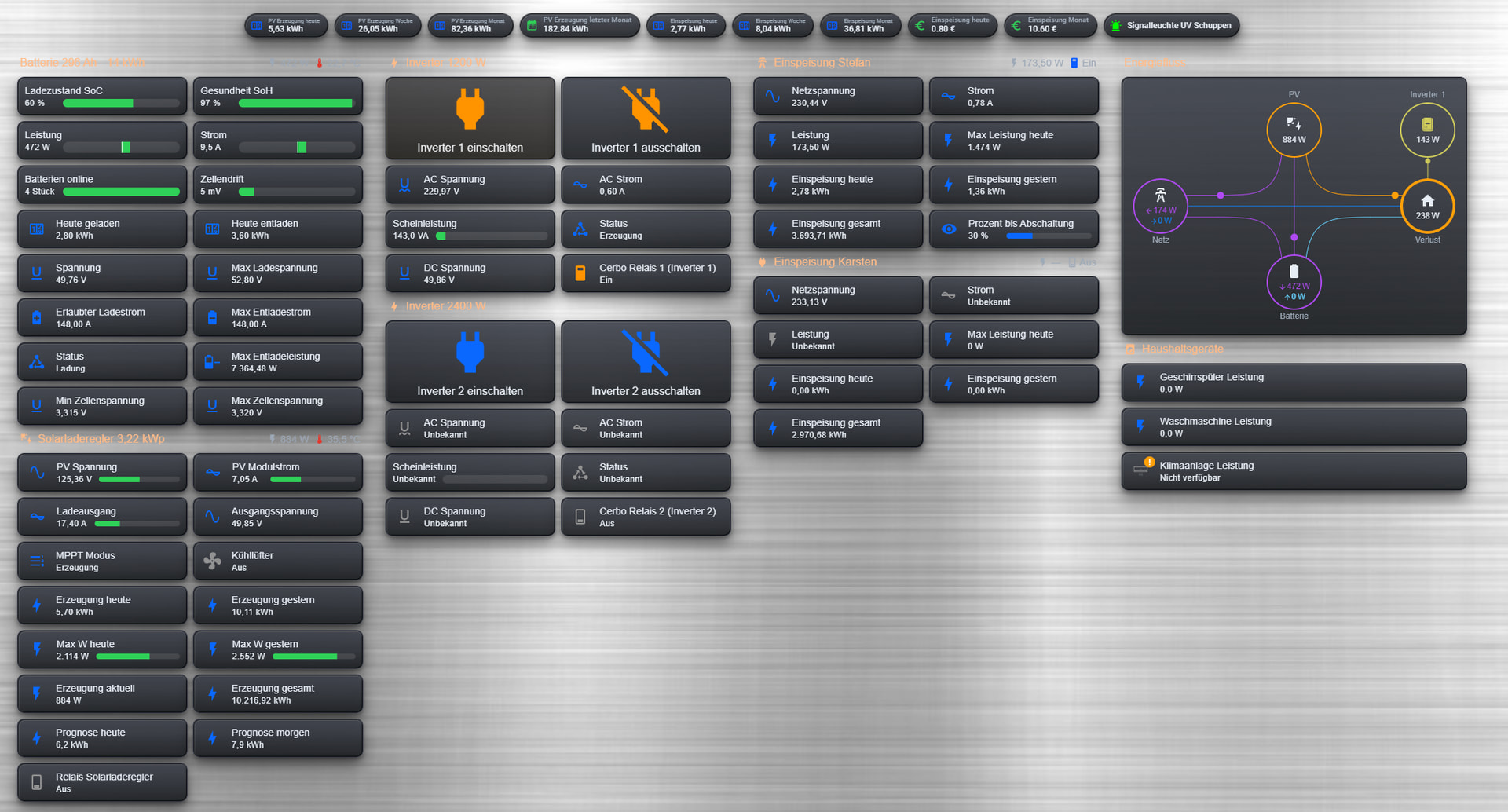
🖌️ Awesome Theme Collection für Home Assistant

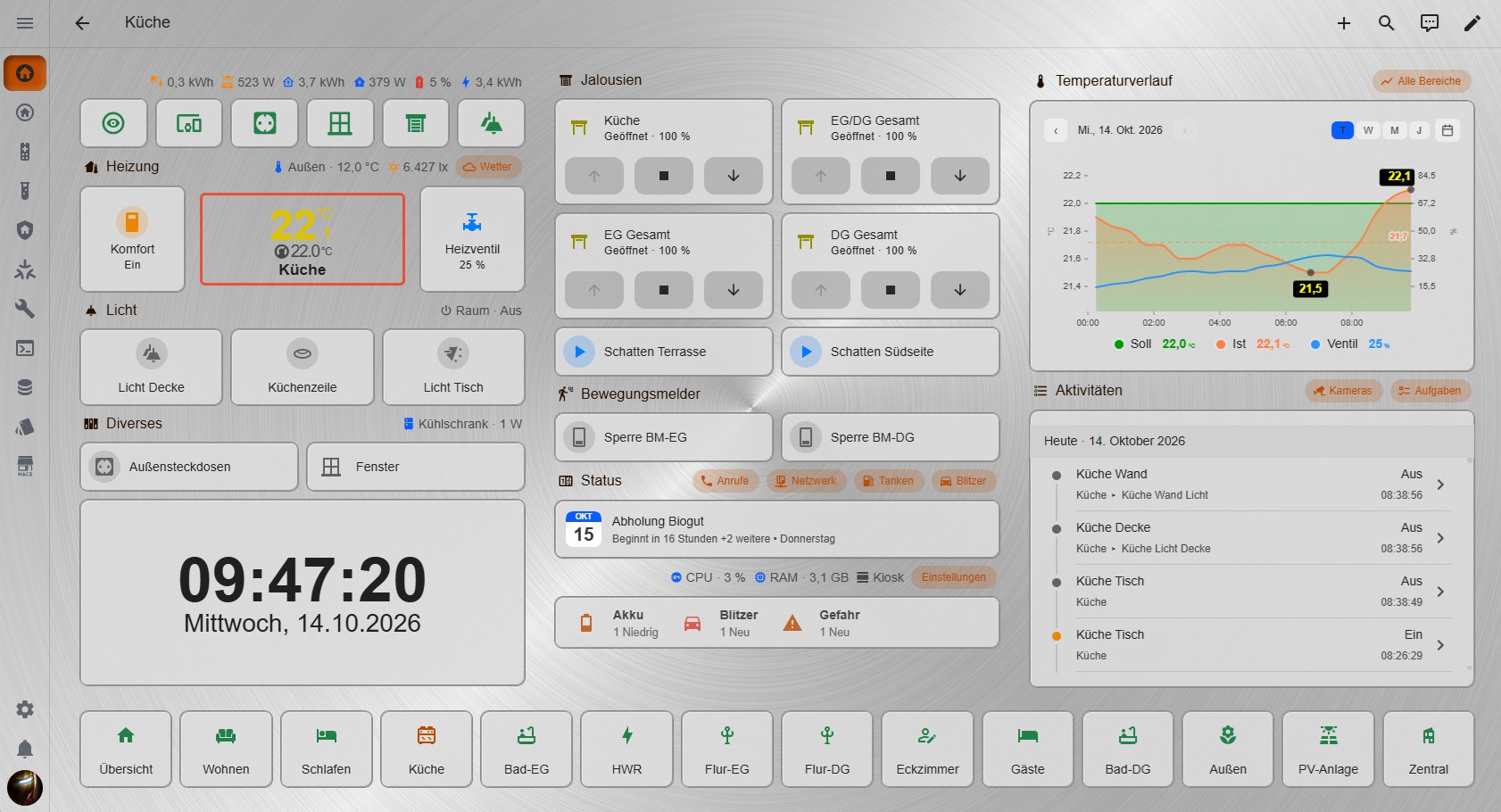
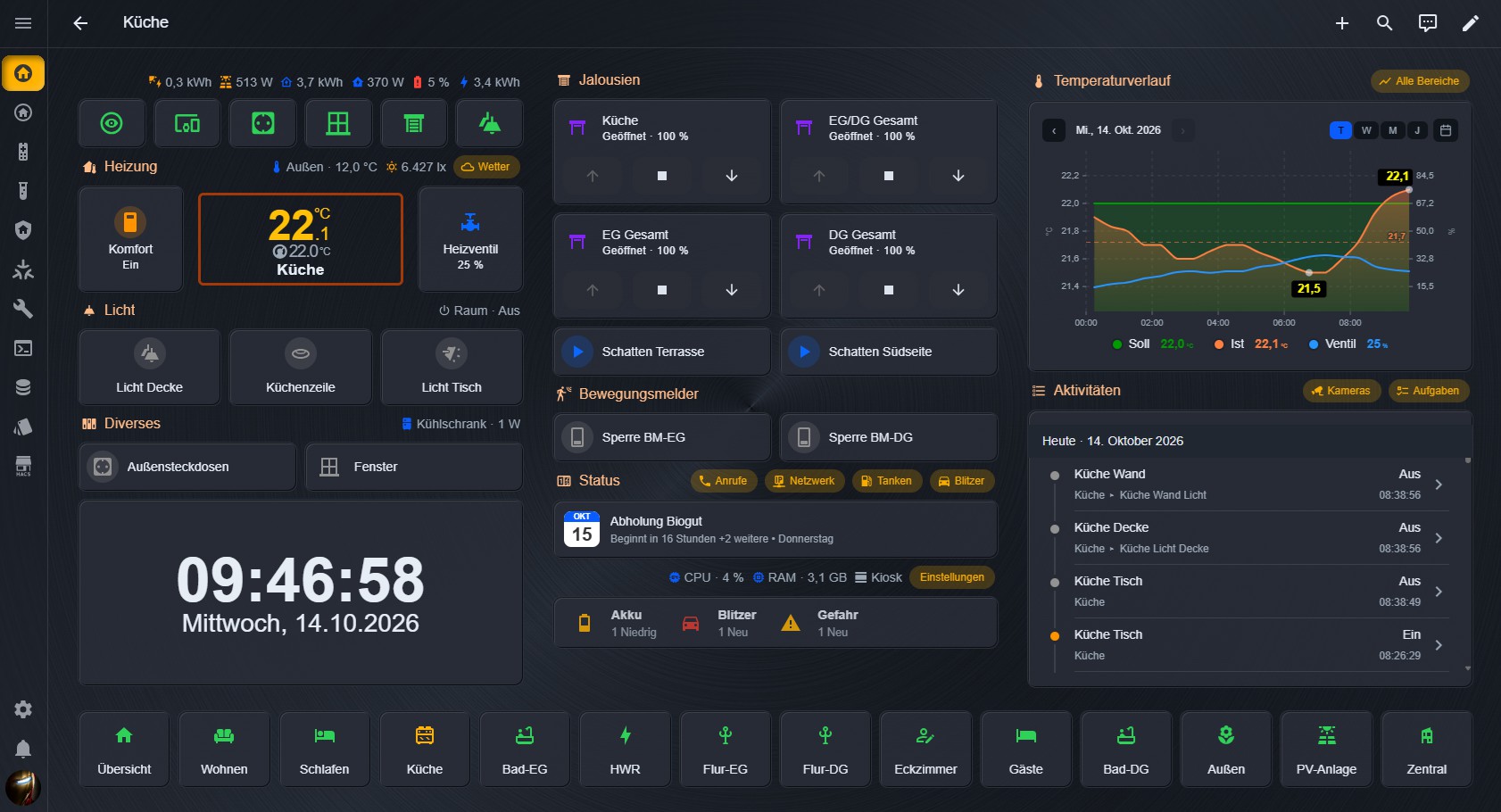
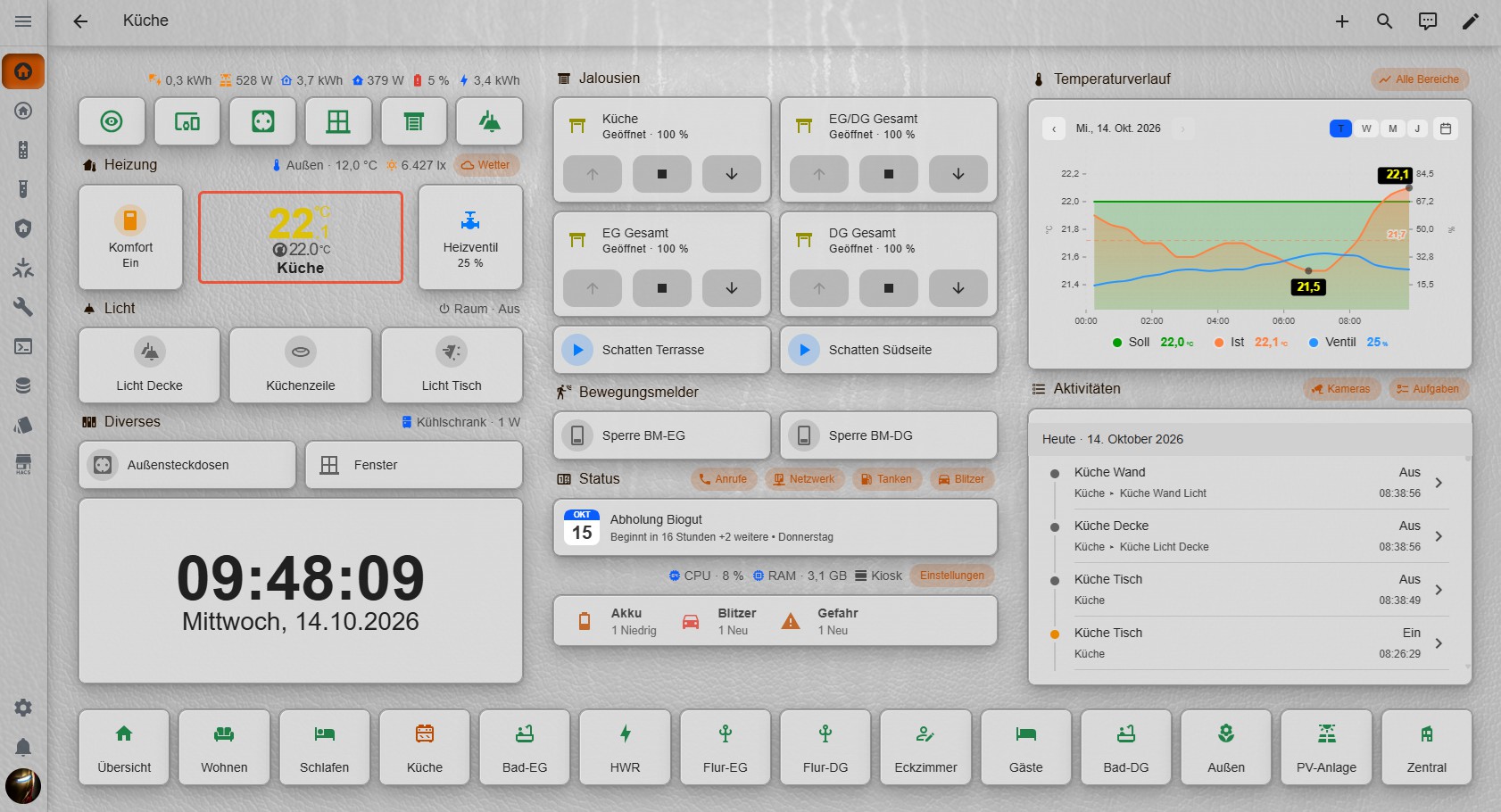
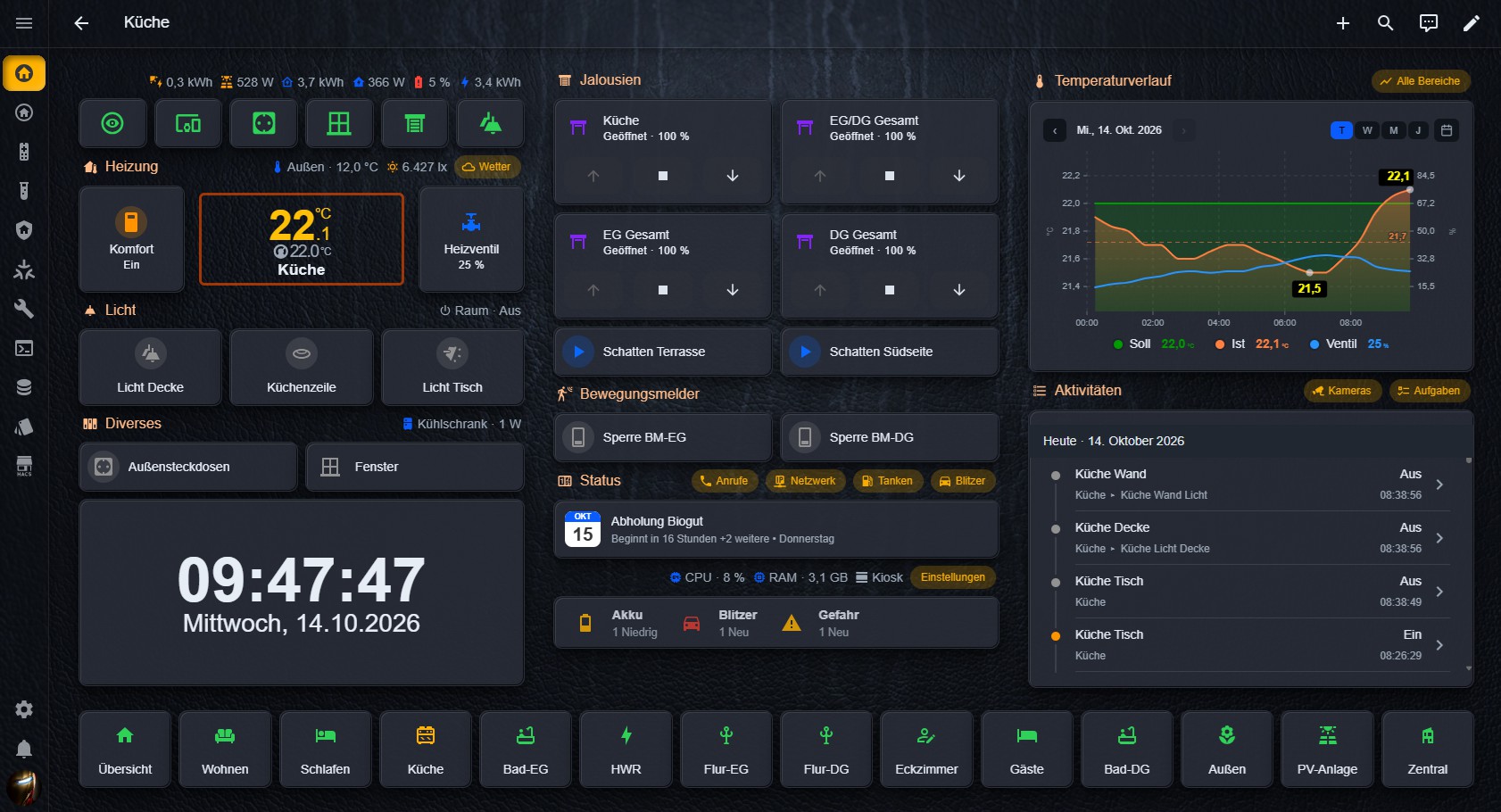
Ich möchte euch heute meine Awesome-Theme-Collection vorstellen. Entstanden ist Sie da ich mit dem Standard-Design von HA nicht zufrieden war und auch nicht alles einzeln von Hand stylen wollte.
Sie wurde mit HATG ( GitHub - Piranha1605/ha-theme-generator: Home Assistant Theme Generator with HACS support · GitHub ) erstellt und nutzt intensiv die UIX-Erweiterung ( GitHub - Lint-Free-Technology/uix: 💡 UI eXtension 💡 Add CSS styles to (almost) any part of the Home Assistant UI. · GitHub ). Es geht auch ohne, aber dann nur das HA-Design mit anderen Farben.
Vielleicht ist ja für den Einen oder Anderen was dabei. Die Theme-Collection wurde bewusst als Integration angelegt, da es sonst die Konfigurationmöglichkeiten nicht geben würde.

Awesome Theme Collection für Home Assistant

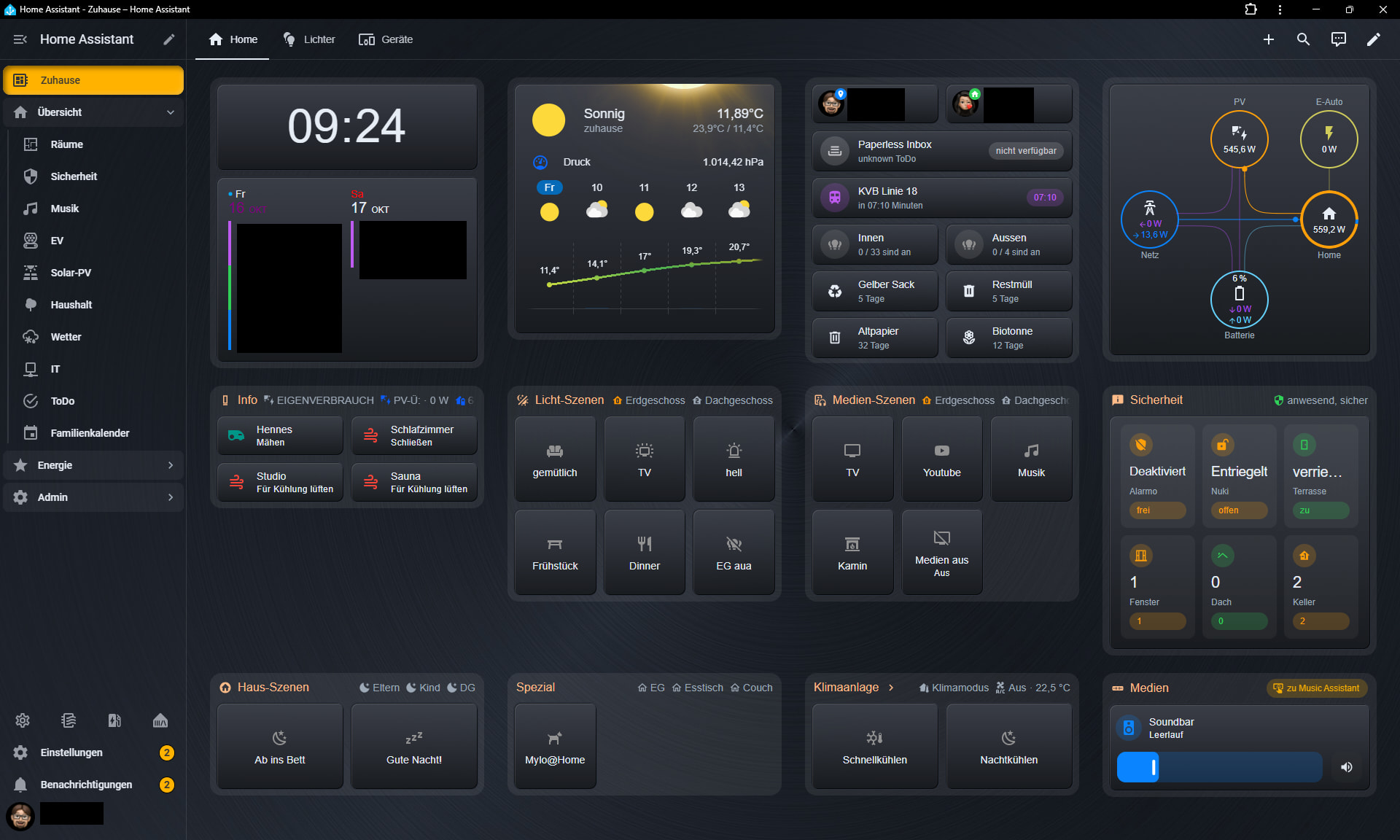
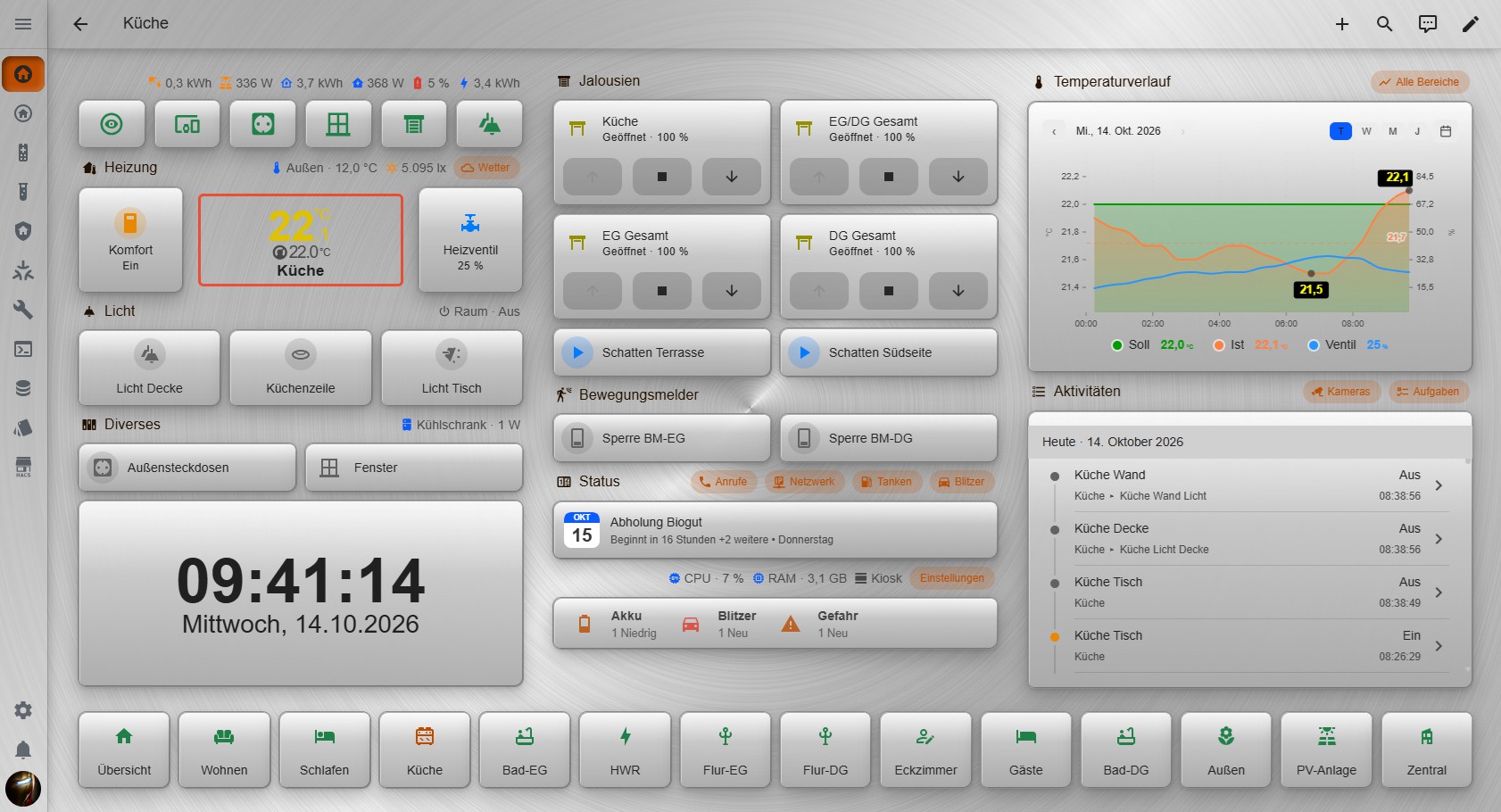
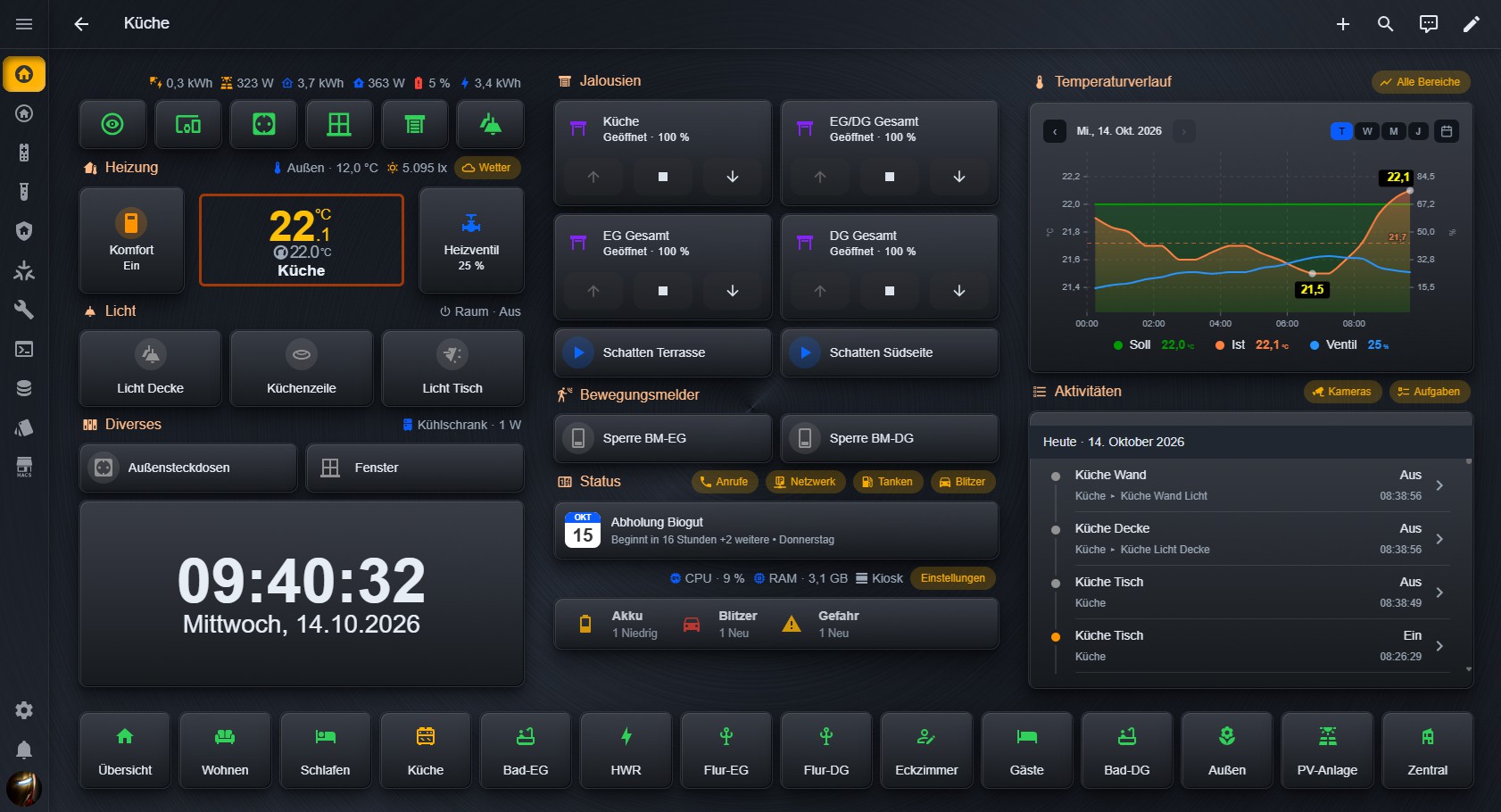
Das ist eine Kollektion von UIX-Themes mit passenden Hintergründen für Home Assistant. Die Themes stylen (fast) alle HA-Standard-Karten, Custom-Karten, Bubble-Karten und Mushroom-Karten mit einem einheitlichen Aussehen.
Zusätzlich werden alle Seiten (Einstellungen, Profile, HACS usw.) und Dialoge, Bubble-Card-Popups mit dem Dashboard-Hintergrund versehen. Die Themes nutzen alle das gleiche Farbschema, unterscheiden sich beim Kartenstyling, mit Schatten oder Ohne und der Wahl des Hintergrundes.

Enthaltene Themes

Für die Nutzung ist es erforderlich, das die Themes beim HA-Start geladen werden (siehe Installationsanweisungen). Da die Themes intensiven Gebrauch von der UIX-Erweiterung machen, ist es für das vorgesehene Aussehen erforderlich das die UIX-Erweiterung installiert ist (siehe Installationsanweisungen).
Ohne UIX funktioniert es auch, aber sieht dann nur nach einem Standard-HA-Theme mit anderer Farbpalette aus. Die Themes richten sich an Alle die nicht alles von Hand stylen wollen, aber trotzdem ein schönes, gleichmäßiges Aussehen haben wollen.

Besonderer Dank geht an Piranha1605 für seinen HATG ( GitHub - Piranha1605/ha-theme-generator: Home Assistant Theme Generator with HACS support · GitHub ) und Lint-Free-Technology für die UIX-Erweiterung ( GitHub - Lint-Free-Technology/uix: 💡 UI eXtension 💡 Add CSS styles to (almost) any part of the Home Assistant UI. · GitHub ).
Ohne die Beiden wäre die Themes-Kollektion nicht enstanden.

Installationsanweisungen

Bitte gehen Sie die folgenden Schritte genau durch, um eine reibungslose Funktion zu gewährleisten !

1. Home Assistant Konfiguration

Die Integration modifiziert mit Absicht nicht deine configuration.yaml. Deshalb muss der folgende Eintrag auch selbst von Hand erledigt werden. Wenn der Eintrag bereits vorhanden ist, bitte zu 2. springen.

Damit Home Assistant die installierten Themes auch nutzen kann, füge Folgendes deiner configuration.yaml hinzu:

frontend:
  themes: !include_dir_merge_named themes

Nach der Änderung der configuration.yaml, Home Assistant neu starten.

2. UIX-Erweiterung installieren

Wenn die UIX-Erweiterung bereits installiert ist und die UIX-Einstellungen in „Experimental settings“ gemacht sind, bitte zu 3. springen.

In HACS nach „uix“ suchen und die UIX-Erweiterung (( GitHub - Lint-Free-Technology/uix: 💡 UI eXtension 💡 Add CSS styles to (almost) any part of the Home Assistant UI. · GitHub ) installieren.

Nach HA-Neustart zu „Einstellungen/Geräte & Dienste/UI eXtension for Home Assistant“ gehen. Dann auf das „Zahnrad“ (Konfigurieren) klicken.

„Experimental settings“ auswählen und „Always patch ha-card“ und „Style frame panels loaded as iframe“ anhaken (notwendig damit alle Teile des Themes auch so funktionieren wie sie sollen)

3. Installation der Awesome Theme Kollektion

  1. GitHub - lSi0270/Awesome-Theme-Collection: 8 UIX-Themes with Light & Dark Section · GitHub in HACS manuell als benutzerdefiniertes Repository (Kategorie Integration) hinzufügen, Awesome Theme Collection herunterladen und Home Assistant neu starten.
  2. Zu Einstellungen/Geräte & Dienste.
  3. Integration hinzufügen.
  4. Awesome Theme Collection suchen.
  5. Integration installieren („Designs neu laden“ wird nach der Installation automatisch ausgeführt).
  6. In den Integrations-Einstellungen können gewünschte und nicht gewünschte Themes an- oder abgewählt werden.
  7. Zu Profil (Benutzer) und unter „Design“ das gewünschte Design auswählen und den gewünschten „Design-Modus“

Die Integration legt automatisch die erforderlichen Verzeichnisse an für die Themes (/config/themes/) und für die Hintergründe (/config/www/wallpaper/).

4. Spaß haben

Ich hoffe es zumindest, das es dem Einen oder Anderen auch so gut gefällt wie mir selbst.

Support

Wenn du ein Problem findest oder einen Verbesserungsvorschlag hast, öffne eine issue im Github Repository.

7 „Gefällt mir“

Gefällt mir sehr gut. Bin gerade ein wenig am testen :+1:

1 „Gefällt mir“

Freut mich das es dir gefällt, dein gewähltes Theme ist auch mein aktueller Favorit :slight_smile:

1 „Gefällt mir“

Hey, ein sehr schöne Theme! Wäre es möglich andere Hintergrundbilder zu verwenden?

1 „Gefällt mir“

Kurzer Test. Ja geht.

2 „Gefällt mir“

Schaut gleich mal aufgeräumter aus, als das Bild von oben! :wink:

2 „Gefällt mir“

Ja das geht .. entweder mit HATG oder im yaml-code selbst. Die beiliegenden Hintergründe sind auf das Farbschema und Design-Modus (Hell/Dunkel) abgestimmt. Bedenke aber dabei das ein anderes Hintergrundbild die Lesbarkeit negativ beeinflussen könnte.

1 „Gefällt mir“

OK, danke. Ich möchte auch gar nicht groß eingreifen, sondern nur eine ruhigere Optik erreichen.

1 „Gefällt mir“

Meinst du den Dashboard-Hintergrund oder den Kartenhintergrund ? .. Wenn du vielleicht den Kartenhintergrund meinst, kannst du auch die Flat-Design Themes mal testen (die haben keinen Farbverlauf als Hintergrund der Karten).

1 „Gefällt mir“

Ich meine tatsächlich den Dashboard-Hintergrund, ich hätte da lieber einen dezenten Farbverlauf. Den Farbverlauf in den Karten finde ich richtig toll.

1 „Gefällt mir“

Die Idee, auch Einstellungen und Popups in denselben Look einzubeziehen, gefällt mir richtig gut :+1: Gerade wenn man Standard-Karten, Mushroom und Bubble mischt, wirkt das Dashboard sonst schnell zusammengewürfelt.

Hast du die Themes auch schon auf dem Handy und auf einem älteren Wandtablet ausprobiert? Mich würde interessieren, wie es dort mit der Lesbarkeit und der Geschwindigkeit aussieht.

Danke fürs Teilen! :slightly_smiling_face:

Ich habe das aktuell auf unserem zentralen 22”-Walldisplay, iPhones und Macbook. Sieht überall toll aus.

Zum einheitlichen Look:

Genau das war der Plan das zu erreichen.

Zur Performance:

Natürlich kostet das Design Performance, ich habe aber bewusst auf die großen Performancekiller wie Blur weitestgehend verzichtet. Es ist also nicht die gleiche Geschwindigkeit wie mit dem Standard-Design zu erwarten.

Auf meinem Samsung Tab S8+ und S25 Ultra läuft es unauffällig. Ich habe es auch auf einem uralten Samsung Tab 5e probiert (das hat erwartungsgemäß natürlich so seine Probleme).

Auf eher schwachen Endgeräten würde ich aber die schattenlosen Designs empfehlen, da die die meiste Renderperformance brauchen denke ich.

Na sieht doch schick aus.. wenn du immer noch den Hintergrund ändern willst und was passendes gefunden hast, kann ich dir gern auch dabei helfen wo du das ändern kannst (einen einfachen Farbverlauf könnte man aber auch direkt setzen). Ich würde es aber eigentlich so lassen, finde das sieht gar nicht unruhig aus.

Ich würde vielleicht noch Kiosk-Mode optional einrichten, dann sieht es noch cleaner aus.

Das Theme sieht echt super aus. Ich habe es direkt installiert und den Shadow ausgewählt.
Vielen Dank für die tolle Programmierung.

Ich setze die “Dashboard Sidebar” ein. Hier der Link:

Kann man das Aussehen auch schick machen?

Hier der yaml-Code der Sidebar:

position: left
width: 200
background: >-
radial-gradient(120% 80% at 15% -10%, rgba(167,139,250,0.55) 0%,
rgba(167,139,250,0) 58%), radial-gradient(90% 55% at 110% 105%,
rgba(34,211,238,0.40) 0%, rgba(34,211,238,0) 55%), linear-gradient(165deg,
#0a0f1f 0%, #141a35 48%, #1d1236 100%)
card_mod:
style: |
.dashboard-sidebar-root {
border-right: 1px solid rgba(148,163,184,0.18);
box-shadow: inset 0 0 70px rgba(124,58,237,0.28);
}


.dashboard-sidebar-category-header {
  text-transform: uppercase;
  letter-spacing: 0.12em;
  font-size: 0.72rem;
  opacity: 0.85;
}

header:

* type: title
  text: Zuhause
  align: center
  text_color: ‚#e9d5ff‘
  card_mod:
  style: |
  .dashboard-sidebar-title {
  background: linear-gradient(90deg,#a78bfa,#22d3ee,#f0abfc,#a78bfa);
  background-size: 300% auto;
  -webkit-background-clip: text;
  background-clip: text;
  color: transparent;
  letter-spacing: 0.20em;
  }
* type: clock
  format: ‚%H:%M‘
  align: center
  text_color: ‚#7dd3fc‘
  card_mod:
  style: |
  .dashboard-sidebar-clock {
  text-shadow: 0 0 18px rgba(125,211,252,0.55);
  font-weight: 400;
  }
* type: date
  format: ‚%A, %-d. %B‘
  align: center
  text_color: white
* type: divider
  color: rgba(148,163,184,0.30)
  body:
* type: category
  title: Zuhause
  text_color: red
  icon: mdi:home
  icon_color: red
  start_collapsed: true
  guide_line: true
  items:
  * type: item
    title: Start
    tap_action:
    action: navigate
    navigation_path: /dashboard-zuhause/0
    text_color: green
    icon_color: green
    icon: mdi:home
  * title: Szenen
    text_color: ‚#e2e8f0‘
    icon: mdi:television-classic
    icon_color: ‚#f0abfc‘
    tap_action:
    action: navigate
    navigation_path: /dashboard-zuhause/szenen
  * title: Kalender
    text_color: ‚#e2e8f0‘
    icon: mdi:calendar
    icon_color: ‚#fb7185‘
    tap_action:
    action: navigate
    navigation_path: /dashboard-zuhause/kalender
  * title: Doorbird
    text_color: ‚#e2e8f0‘
    icon: mdi:cctv
    icon_color: ‚#22d3ee‘
    tap_action:
    action: navigate
    navigation_path: /dashboard-zuhause/doorbird
* type: divider
  color: rgba(148,163,184,0.30)
* type: category
  title: Haus
  text_color: ‚#cbd5e1‘
  icon: mdi:home-alert-outline
  icon_color: ‚#4ade80‘
  start_collapsed: true
  items:
  * title: Übersicht
    text_color: ‚#e2e8f0‘
    icon: mdi:home
    icon_color: ‚#38bdf8‘
    tap_action:
    action: navigate
    navigation_path: /dashboard-rollos/haus
  * title: Licht
    text_color: ‚#e2e8f0‘
    icon: mdi:lightbulb-on-outline
    icon_color: ‚#e2e8f0‘
    tap_action:
    action: navigate
    navigation_path: /dashboard-rollos/licht
  * type: item
    title: Fenster
    tap_action:
    action: navigate
    navigation_path: /dashboard-rollos/fenster
    text_color: ‚#e2e8f0‘
    icon_color: ‚#e2e8f0‘
    icon: mdi:window-shutter
  * type: item
    title: Steckdosen
    tap_action:
    action: navigate
    navigation_path: /dashboard-rollos/steckdosen
    text_color: ‚#e2e8f0‘
    icon_color: ‚#e2e8f0‘
    icon: mdi:power-plug
  * type: item
    title: Temperaturen
    tap_action:
    action: navigate
    navigation_path: /dashboard-rollos/4
    text_color: ‚#e2e8f0‘
    icon_color: ‚#e2e8f0‘
    icon: mdi:thermometer
  * type: item
    title: Alarm
    tap_action:
    action: navigate
    navigation_path: /dashboard-rollos/alarm
    text_color: ‚#e2e8f0‘
    icon_color: ‚#e2e8f0‘
    icon: mdi:alarm-bell
  * type: item
    title: Müll
    tap_action:
    action: navigate
    navigation_path: /dashboard-rollos/6
    text_color: ‚#e2e8f0‘
    icon_color: ‚#e2e8f0‘
    icon: mdi:trash-can
  * type: item
    title: Wasserverbrauch
    tap_action:
    action: navigate
    navigation_path: /dashboard-rollos/wasserverbrauch
    text_color: ‚#e2e8f0‘
    icon_color: ‚#e2e8f0‘
    icon: mdi:water-alert
* type: category
  title: Heizung
  text_color: ‚#cbd5e1‘
  icon: mdi:heat-wave
  icon_color: ‚#4ade80‘
  start_collapsed: true
  items:
  * title: Steuerung
    text_color: ‚#e2e8f0‘
    icon: mdi:tools
    icon_color: ‚#38bdf8‘
    tap_action:
    action: navigate
    navigation_path: /dashboard-heizung/steuerung
  * title: Heizung
    text_color: ‚#e2e8f0‘
    icon: mdi:heat-pump
    icon_color: ‚#e2e8f0‘
    tap_action:
    action: navigate
    navigation_path: /dashboard-heizung/heizung
  * type: item
    title: Zeitpläne
    tap_action:
    action: navigate
    navigation_path: /dashboard-heizung/zeitplane
    text_color: ‚#e2e8f0‘
    icon: mdi:timelapse
    icon_color: ‚#e2e8f0‘
  * type: item
    title: Vitocal 333G
    tap_action:
    action: navigate
    navigation_path: /dashboard-heizung/vitocal-333g
    text_color: ‚#e2e8f0‘
    icon_color: ‚#e2e8f0‘
    icon: mdi:heat-pump
  * type: item
    title: Vicare
    tap_action:
    action: navigate
    navigation_path: /dashboard-heizung/vicare
    text_color: ‚#e2e8f0‘
    icon_color: ‚#e2e8f0‘
    icon: mdi:heat-pump
  * type: item
    title: Pumpen
    tap_action:
    action: navigate
    navigation_path: /dashboard-heizung/pumpen
    text_color: ‚#e2e8f0‘
    icon_color: ‚#e2e8f0‘
    icon: mdi:pump
  * type: item
    title: Verbrauch
    tap_action:
    action: navigate
    navigation_path: /dashboard-heizung/verbrauch
    text_color: ‚#e2e8f0‘
    icon_color: ‚#e2e8f0‘
    icon: mdi:counter
  * type: item
    title: Temperaturen
    tap_action:
    action: navigate
    navigation_path: http://homeassistant.fritz.box:8123/dashboard-heizung/temperaturen
    text_color: ‚#e2e8f0‘
    icon_color: ‚#e2e8f0‘
    icon: mdi:thermometer
* type: category
  title: Energie
  text_color: ‚#cbd5e1‘
  icon: mdi:flash
  icon_color: ‚#4ade80‘
  start_collapsed: true
  items:
  * title: eedc
    text_color: ‚#e2e8f0‘
    icon: mdi:flash
    icon_color: ‚#38bdf8‘
    tap_action:
    action: navigate
    navigation_path: /dashboard-strom/eedc
  * title: EVCC
    tap_action:
    action: navigate
    navigation_path: /dashboard-strom/evcc
    text_color: ‚#e2e8f0‘
    icon_color: ‚#e2e8f0‘
    icon: mdi:car-electric
  * type: item
    title: Zeus
    tap_action:
    action: navigate
    navigation_path: /dashboard-zeus/0
    text_color: ‚#e2e8f0‘
    icon_color: ‚#e2e8f0‘
    icon: mdi:chart-areaspline
  * title: Energie
    text_color: ‚#e2e8f0‘
    icon: mdi:lightning-bolt
    icon_color: ‚#e2e8f0‘
    tap_action:
    action: navigate
    navigation_path: /dashboard-strom/energie
  * type: item
    title: Sunsync
    tap_action:
    action: navigate
    navigation_path: /dashboard-strom/sunsync
    text_color: ‚#e2e8f0‘
    icon_color: ‚#e2e8f0‘
    icon: mdi:flash
  * type: item
    title: Lumina
    tap_action:
    action: navigate
    navigation_path: /dashboard-strom/lumina
    text_color: ‚#e2e8f0‘
    icon_color: ‚#e2e8f0‘
    icon: mdi:solar-power
  * type: item
    title: PV
    tap_action:
    action: navigate
    navigation_path: /dashboard-strom/4
    text_color: ‚#e2e8f0‘
    icon_color: ‚#e2e8f0‘
    icon: mdi:flash
  * type: item
    title: Strom
    tap_action:
    action: navigate
    navigation_path: /dashboard-strom/strom
    text_color: ‚#e2e8f0‘
    icon_color: ‚#e2e8f0‘
    icon: mdi:lightning-bolt
  * type: item
    title: Prognose
    tap_action:
    action: navigate
    navigation_path: /dashboard-strom/prognose
    text_color: ‚#e2e8f0‘
    icon_color: ‚#e2e8f0‘
    icon: mdi:chart-areaspline
  * type: item
    title: Statistik
    tap_action:
    action: navigate
    navigation_path: /dashboard-strom/statistik2
    text_color: ‚#e2e8f0‘
    icon_color: ‚#e2e8f0‘
    icon: mdi:chart-timeline
* type: category
  title: Photovoltaik
  text_color: ‚#cbd5e1‘
  icon: mdi:solar-panel
  icon_color: ‚#4ade80‘
  start_collapsed: true
  items:
  * title: Übersicht
    text_color: ‚#e2e8f0‘
    icon: mdi:solar-power-variant-outline
    icon_color: ‚#38bdf8‘
    tap_action:
    action: navigate
    navigation_path: /dashboard-plenti11/pv-uebersicht
  * title: Steuerung
    text_color: ‚#e2e8f0‘
    icon: mdi:solar-power
    icon_color: ‚#e2e8f0‘
    tap_action:
    action: navigate
    navigation_path: /dashboard-plenti11/pv-steuerung
  * type: item
    title: Statistik
    tap_action:
    action: navigate
    navigation_path: /dashboard-plenti11/pv-statistiken
    text_color: ‚#e2e8f0‘
    icon_color: ‚#e2e8f0‘
    icon: mdi:chart-timeline
  * type: item
    title: Batterie
    tap_action:
    action: navigate
    navigation_path: /dashboard-plenti11/pv-batterie
    text_color: ‚#e2e8f0‘
    icon_color: ‚#e2e8f0‘
    icon: mdi:home-battery
  * type: item
    title: Plenticore
    tap_action:
    action: navigate
    navigation_path: /dashboard-plenti11/plenticore-g3
    text_color: ‚#e2e8f0‘
    icon_color: ‚#e2e8f0‘
    icon: mdi:solar-power
  * type: item
    title: Piko
    tap_action:
    action: navigate
    navigation_path: /dashboard-plenti11/piko-20
    text_color: ‚#e2e8f0‘
    icon_color: ‚#e2e8f0‘
    icon: mdi:solar-power-variant
* type: category
  title: Wetter
  text_color: ‚#cbd5e1‘
  icon: mdi:weather-cloudy
  icon_color: ‚#4ade80‘
  start_collapsed: true
  items:
  * title: Wetterstation
    text_color: ‚#e2e8f0‘
    icon: mdi:thermometer-check
    icon_color: ‚#38bdf8‘
    tap_action:
    action: navigate
    navigation_path: /dashboard-wetter/0
  * title: Ecowitt
    text_color: ‚#e2e8f0‘
    icon: mdi:thermometer
    icon_color: ‚#e2e8f0‘
    tap_action:
    action: navigate
    navigation_path: /dashboard-wetter/wetterstation
  * type: item
    title: Wetterwarnung
    tap_action:
    action: navigate
    navigation_path: /dashboard-wetter/wetterwarnung
    text_color: ‚#e2e8f0‘
    icon_color: ‚#e2e8f0‘
    icon: mdi:weather-lightning-rainy
  * type: item
    title: Wetterkarte
    tap_action:
    action: navigate
    navigation_path: /dashboard-wetter/wetterkarte
    text_color: ‚#e2e8f0‘
    icon_color: ‚#e2e8f0‘
    icon: mdi:weather-rainy
  * type: item
    title: Regen
    tap_action:
    action: navigate
    navigation_path: /dashboard-wetter/regen
    text_color: ‚#e2e8f0‘
    icon_color: ‚#e2e8f0‘
    icon: mdi:weather-pouring
  * type: item
    title: Wettervorhersage
    tap_action:
    action: navigate
    navigation_path: /dashboard-wetter/wettervorhersage
    text_color: ‚#e2e8f0‘
    icon_color: ‚#e2e8f0‘
    icon: mdi:weather-windy
  * type: item
    title: Blitzortung
    tap_action:
    action: navigate
    navigation_path: /dashboard-wetter/blitzortung
    text_color: ‚#e2e8f0‘
    icon_color: ‚#e2e8f0‘
    icon: mdi:lightning-bolt
  * type: item
    title: Wetterprognose
    tap_action:
    action: navigate
    navigation_path: /dashboard-wetter/7
    text_color: ‚#e2e8f0‘
    icon_color: ‚#e2e8f0‘
    icon: mdi:weather-cloudy-alert
  * type: item
    title: Biowetter
    tap_action:
    action: navigate
    navigation_path: /dashboard-wetter/biowetter
    text_color: ‚#e2e8f0‘
    icon_color: ‚#e2e8f0‘
    icon: mdi:sun-thermometer
  * type: item
    title: Wetterprognose2
    tap_action:
    action: navigate
    navigation_path: /dashboard-wetter/9
    text_color: ‚#e2e8f0‘
    icon_color: ‚#e2e8f0‘
    icon: mdi:weather-cloudy-arrow-right
* type: category
  title: Garten
  text_color: ‚#cbd5e1‘
  icon: mdi:flower
  icon_color: ‚#4ade80‘
  start_collapsed: true
  items:
  * title: Beregnung
    text_color: ‚#e2e8f0‘
    icon: mdi:water
    icon_color: ‚#38bdf8‘
    tap_action:
    action: navigate
    navigation_path: /dashboard-garten/0
  * title: Wasserverbrauch
    text_color: ‚#e2e8f0‘
    icon: mdi:water-alert
    icon_color: ‚#e2e8f0‘
    tap_action:
    action: navigate
    navigation_path: /dashboard-garten/wasserverbrauch
  * type: item
    title: Regen
    tap_action:
    action: navigate
    navigation_path: /dashboard-garten/regen
    text_color: ‚#e2e8f0‘
    icon_color: ‚#e2e8f0‘
    icon: mdi:weather-pouring
  * type: item
    title: Hugo
    tap_action:
    action: navigate
    navigation_path: /dashboard-garten/hugo
    text_color: ‚#e2e8f0‘
    icon_color: ‚#e2e8f0‘
    icon: mdi:mower
  * type: item
    title: Teich
    tap_action:
    action: navigate
    navigation_path: /dashboard-garten/teich
    text_color: ‚#e2e8f0‘
    icon_color: ‚#e2e8f0‘
    icon: mdi:pool
* type: category
  title: Haushalt
  text_color: ‚#cbd5e1‘
  icon: mdi:shopping
  icon_color: ‚#4ade80‘
  start_collapsed: true
  items:
  * title: Tanken
    text_color: ‚#e2e8f0‘
    icon: mdi:gas-station
    icon_color: ‚#38bdf8‘
    tap_action:
    action: navigate
    navigation_path: /dashboard-haushalt/0
  * title: Bring!
    text_color: ‚#e2e8f0‘
    icon: mdi:basket
    icon_color: ‚#e2e8f0‘
    tap_action:
    action: navigate
    navigation_path: /dashboard-haushalt/bringshoppinglist
  * type: item
    title: Müll
    tap_action:
    action: navigate
    navigation_path: /dashboard-haushalt/abholung
    text_color: ‚#e2e8f0‘
    icon_color: ‚#e2e8f0‘
    icon: mdi:trash-can
* type: category
  title: Geräte
  text_color: ‚#cbd5e1‘
  icon: mdi:washing-machine
  icon_color: ‚#4ade80‘
  start_collapsed: true
  items:
  * title: Waschen
    text_color: ‚#e2e8f0‘
    icon: mdi:washing-machine
    icon_color: ‚#38bdf8‘
    tap_action:
    action: navigate
    navigation_path: /dashboard-gerate/waschen
  * title: Spülmaschine
    text_color: ‚#e2e8f0‘
    icon: mdi:dishwasher
    icon_color: ‚#e2e8f0‘
    tap_action:
    action: navigate
    navigation_path: /dashboard-gerate/spulmaschine
  * type: item
    title: Kühlschränke
    tap_action:
    action: navigate
    navigation_path: /dashboard-gerate/kuhlen
    text_color: ‚#e2e8f0‘
    icon_color: ‚#e2e8f0‘
    icon: mdi:fridge
  * type: item
    title: Backöfen
    tap_action:
    action: navigate
    navigation_path: /dashboard-gerate/backofen
    text_color: ‚#e2e8f0‘
    icon_color: ‚#e2e8f0‘
    icon: mdi:stove
  * type: item
    title: Herd
    tap_action:
    action: navigate
    navigation_path: /dashboard-gerate/herd
    text_color: ‚#e2e8f0‘
    icon_color: ‚#e2e8f0‘
    icon: mdi:pot-steam
* type: category
  title: Fritzbox
  items:
  * type: item
    title: Anrufe
    tap_action:
    action: navigate
    navigation_path: /dashboard-fritzbox/anrufe
    text_color: ‚#e2e8f0‘
    icon: mdi:card-account-details
    icon_color: ‚#e2e8f0‘
  * type: item
    title: Gäste WLAN
    tap_action:
    action: navigate
    navigation_path: /dashboard-fritzbox/gaste-wlan
    text_color: ‚#e2e8f0‘
    icon: mdi:wifi
    icon_color: ‚#e2e8f0‘
    text_color: ‚#cbd5e1‘
    icon: mdi:phone
    icon_color: ‚#4ade80‘
* type: category
  title: System
  text_color: ‚#cbd5e1‘
  icon: mdi:toolbox
  icon_color: ‚#4ade80‘
  start_collapsed: true
  items:
  * title: Auslastung
    text_color: ‚#e2e8f0‘
    icon: mdi:speedometer
    icon_color: ‚#38bdf8‘
    tap_action:
    action: navigate
    navigation_path: /dashboard-system/system
  * title: USV
    text_color: ‚#e2e8f0‘
    icon: mdi:battery-charging-50
    icon_color: ‚#e2e8f0‘
    tap_action:
    action: navigate
    navigation_path: /dashboard-system/1
  * type: item
    title: Batterien
    tap_action:
    action: navigate
    navigation_path: /dashboard-system/batterien
    text_color: ‚#e2e8f0‘
    icon_color: ‚#e2e8f0‘
    icon: mdi:battery
  * type: item
    title: Yamaha
    tap_action:
    action: navigate
    navigation_path: /dashboard-system/yamaha
    text_color: ‚#e2e8f0‘
    icon_color: ‚#e2e8f0‘
    icon: mdi:amplifier
  * type: item
    title: Xerox C235
    tap_action:
    action: navigate
    navigation_path: /dashboard-system/xerox-c235
    text_color: ‚#e2e8f0‘
    icon_color: ‚#e2e8f0‘
    icon: mdi:printer
* type: item
  title: Alarmanlage
  tap_action:
  action: navigate
  navigation_path: /dashboard-alarm/0
  icon: mdi:shield-home
  text_color: red
  icon_color: red
* type: divider
  footer:
  divider: true
  buttons:
  * icon: mdi:cog
    icon_color: ‚#94a3b8‘
    title: Settings
    tap_action:
    action: navigate
    navigation_path: /config/dashboard

EDIT by Jay: Code immer über die Codefunktion „</>“ im Editor einfügen.

Als Erstes würde ich mal card_mod: durch uix: ersetzen. Noch geht es zwar auch so, aber wer weiss wie lange noch. Und da du ja schon per card_mod stylest, kann man das ja noch anpassen und dem Theme optisch anpassen, genau wie die Farben in den einzelnen Abschnitten. Das müsstest du aber selbst erledigen, da ich den nicht nutze.

Und als kleiner Hinweis: Code immer formatiert reinkopieren, damit man das richtig erkennen kann.
1 „Gefällt mir“

Sorry, der code sollte in das Code-Feld kopiert werden.

Ich habe auf Github zur Sidebar ein Issue erstellt und hoffe, dass der Entwicklung statt card-mod nun eine Unterstützung zu uix einbaut.