Ich brauche dringend eure Hilfe 
Ich verwende Paperless-ngx im eigenem Docker (Stack) auf meinem RasPi5
Heute ist mir aufgefallen das der Container dauernd neu startet und natürlich die Webanbindung natürlich auch nicht mehr funktioniert 
Also mal im Log nachgesehen:
paperless webserver log s6-rc: warning: service s6rc-oneshot-runner is marked as essential, not stopping it
und
django.core.exceptions.ImproperlyConfigured: PAPERLESS_SECRET_KEY is not set or is the default 'change-me' value. A unique, secret key is required for secure operation. Generate one with: python3 -c "import secrets; print(secrets.token_urlsafe(64))"
Natürlich verwende ich im Stack:
image: ghcr.io/paperless-ngx/paperless-ngx:latest
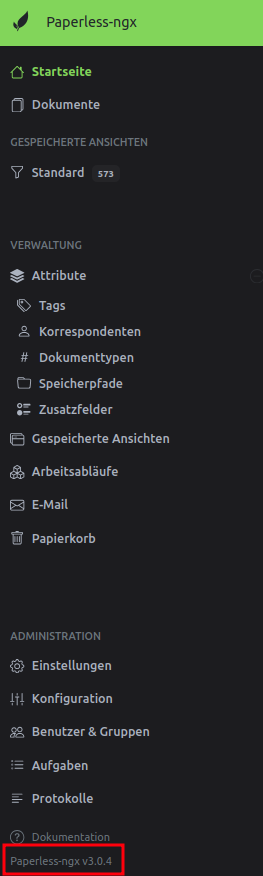
was bedeutet das momentan latest => 3.0.4 ist
Also mal gesucht:
How to Fix
-
Run the generator command in your terminal:
python3 -c "import secrets; print(secrets.token_urlsafe(64))" -
Copy the long text string output by the command.
-
Set the environment variable in your
paperless.conffile or yourdocker-compose.envfile as:
PAPERLESS_SECRET_KEY=your_generated_string_here -
Restart your Paperless-ngx service or container for the changes to take effect. [1, 2, 3]
Hier scheitere ich 
ich bekomme die
PAPERLESS_SECRET_KEY=your_generated_string_here (natürlich ersetzt durch den neu generierten)
nicht in meinem Docker Stack ?!?
Mein Docker Stack sieht momentan so aus:
# Docker Compose file for running paperless from the Docker Hub.
# This file contains everything paperless needs to run.
# Paperless supports amd64, arm and arm64 hardware.
#
# All compose files of paperless configure paperless in the following way:
#
# - Paperless is (re)started on system boot, if it was running before shutdown.
# - Docker volumes for storing data are managed by Docker.
# - Folders for importing and exporting files are created in the same directory
#   as this file and mounted to the correct folders inside the container.
# - Paperless listens on port 8010.
#
# In addition to that, this Docker Compose file adds the following optional
# configurations:
#
# - Instead of SQLite (default), PostgreSQL is used as the database server.
#
# To install and update paperless with this file, do the following:
#
# - Open portainer Stacks list and click 'Add stack'
# - Paste the contents of this file and assign a name, e.g. 'paperless'
# - Click 'Deploy the stack' and wait for it to be deployed
# - Open the list of containers, select paperless_webserver_1
# - Click 'Console' and then 'Connect' to open the command line inside the container
# - Run 'python3 manage.py createsuperuser' to create a user
# - Exit the console
#
# For more extensive installation and update instructions, refer to the
# documentation.

services:
  broker:
    image: docker.io/library/redis:7
    restart: unless-stopped
    volumes:
      - redisdata:/data

  db:
    image: docker.io/library/postgres:16
    restart: unless-stopped
    volumes:
      - pgdata:/var/lib/postgresql/data
    environment:
      POSTGRES_DB: paperless
      POSTGRES_USER: paperless
      POSTGRES_PASSWORD: paperless

  webserver:
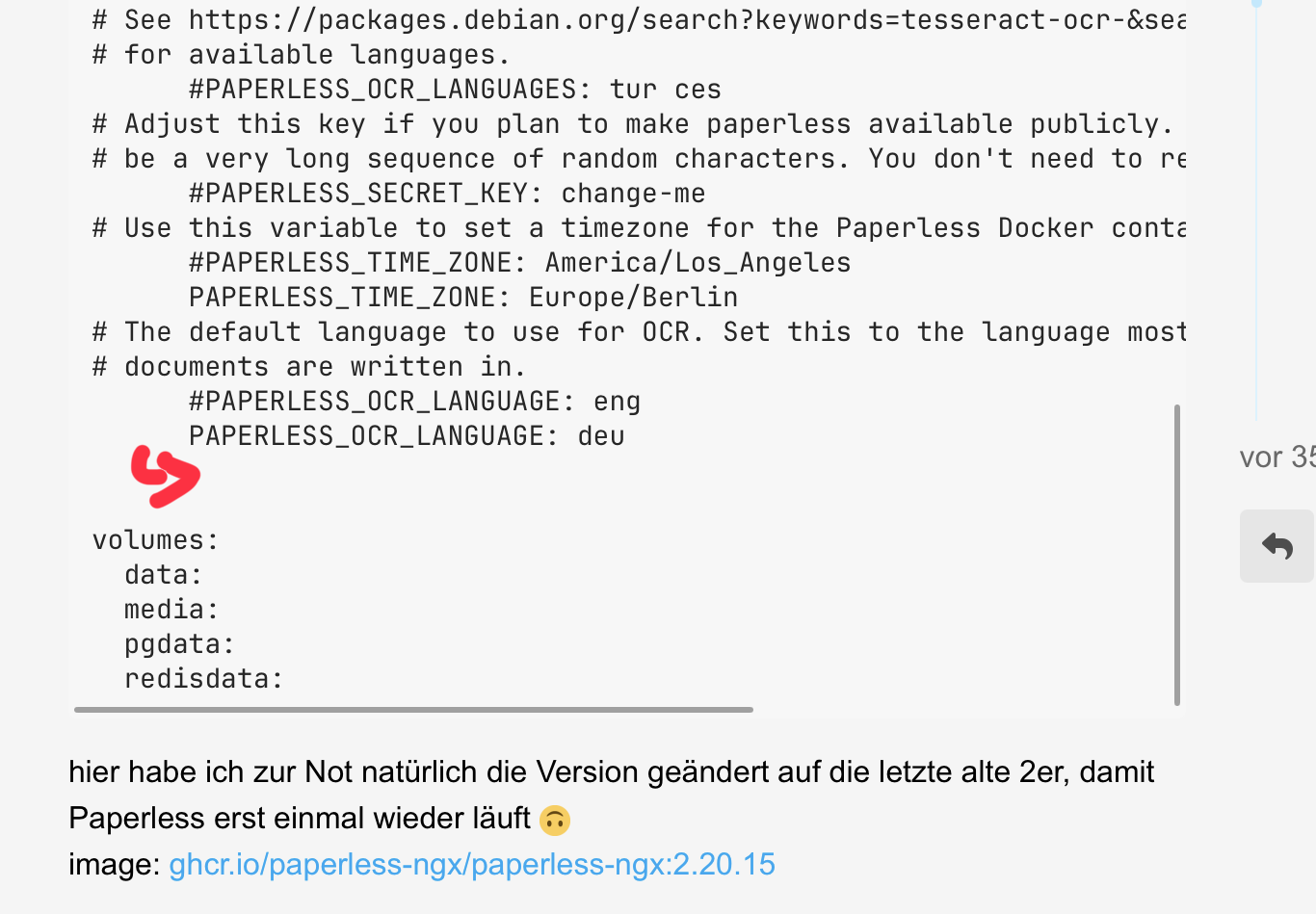
    image: ghcr.io/paperless-ngx/paperless-ngx:2.20.15
#    image: ghcr.io/paperless-ngx/paperless-ngx:latest
    restart: unless-stopped
    depends_on:
      - db
      - broker
    ports:
      - "8010:8000"
    volumes:
      - /home/shares/pi/500gb-sdb1/Paperless/data:/usr/src/paperless/data
      - /home/shares/pi/500gb-sdb1/Paperless/media:/usr/src/paperless/media
      - /home/shares/pi/500gb-sdb1/Paperless/paperless-outbox:/usr/src/paperless/export
      - /home/shares/pi/500gb-sdb1/Paperless/paperless-inbox:/usr/src/paperless/consume
    environment:
      PAPERLESS_REDIS: redis://broker:6379
      PAPERLESS_DBHOST: db
# The UID and GID of the user used to run paperless in the container. Set this
# to your UID and GID on the host so that you have write access to the
# consumption directory.
      USERMAP_UID: 1000
      USERMAP_GID: 1000
# Additional languages to install for text recognition, separated by a
# whitespace. Note that this is
# different from PAPERLESS_OCR_LANGUAGE (default=eng), which defines the
# language used for OCR.
# The container installs English, German, Italian, Spanish and French by
# default.
# See https://packages.debian.org/search?keywords=tesseract-ocr-&searchon=names&suite=buster
# for available languages.
      #PAPERLESS_OCR_LANGUAGES: tur ces
# Adjust this key if you plan to make paperless available publicly. It should
# be a very long sequence of random characters. You don't need to remember it.
      #PAPERLESS_SECRET_KEY: change-me
# Use this variable to set a timezone for the Paperless Docker containers. If not specified, defaults to UTC.
      #PAPERLESS_TIME_ZONE: America/Los_Angeles
      PAPERLESS_TIME_ZONE: Europe/Berlin
# The default language to use for OCR. Set this to the language most of your
# documents are written in.
      #PAPERLESS_OCR_LANGUAGE: eng
      PAPERLESS_OCR_LANGUAGE: deu


volumes:
  data:
  media:
  pgdata:
  redisdata:
hier habe ich zur Not natürlich die Version geändert auf die letzte alte 2er, damit Paperless erst einmal wieder läuft 
image: ghcr.io/paperless-ngx/paperless-ngx:2.20.15